47-Rendering


这一节课主要是介绍一下rendering是什么意思,接下来会具体讲解。
47-65集,基本上都是讲解rendering相关内容,涉及到编写代码的地方很少,但是内容很重要。涉及到代码相关的有:generateStaticParams、server-only、client-only、context providers。
内容很重要,意思是说告诉我们nextjs是怎么进行渲染的,里面的代码是怎么运行的,理解了这些内容,写代码会更清晰,大脑中就有了东西。
48-Client side Rendering(CSR)
这节课主要讲CSR的概念和优缺点,主要说明了CSR有哪些缺点,由此就带出下一节的SSR。

下面是SPA的渲染过程,重点就是html文件里面的一个<div id="root"></div>,和引入的js文件:

JS reference:JS引用。
SPA很流行,但是有一些缺陷。


49-Server-side Rendering(SSR)
这节课主要讲SSR的概念和优缺点,主要说明了SSR的缺点,由此带出下一节的Suspense SSR的概念。

SSR是怎么做的?
when a request comes in, instead of sending a bare html file that needs client-side javascript to build the page, the server now handles rendering the component html.
this quickly formed html document goes straight to the browser.
当请求进来时,服务器现在负责渲染完整的html页面,而不是发送一个需要客户端javascript来构建页面的裸html文件。快速形成的html文档直接发送到浏览器。

since the html is already generated in the server, the browser can quickly parse and display it. Give us faster initial page load time.

SSR有以上好处,但是也有缺陷:

html页面虽然渲染很快,但是还有一个js文件,只有当js文件加载完成之后,并将js代码注入到html之后,用户才能操作交互。这个注入的过程叫做:hydration。hydration本意是水合作用,可以把这个过程看成是一些干货,需要水发之后才能成为美味。

hydration的作用如下:

服务端的解决方案有两种:SSG和SSR,但这两种经常被统称为SSR。

SSR的缺点:


上面的三个缺点,就造成了SSR的这些现象:

50-Suspense SSR

为了解决上面的问题,react18引入了suspense SSR architecture。

使用<Suspense>可以达到上面的两种效果。
传统的SSR是这样渲染的:

以下是一段说明:
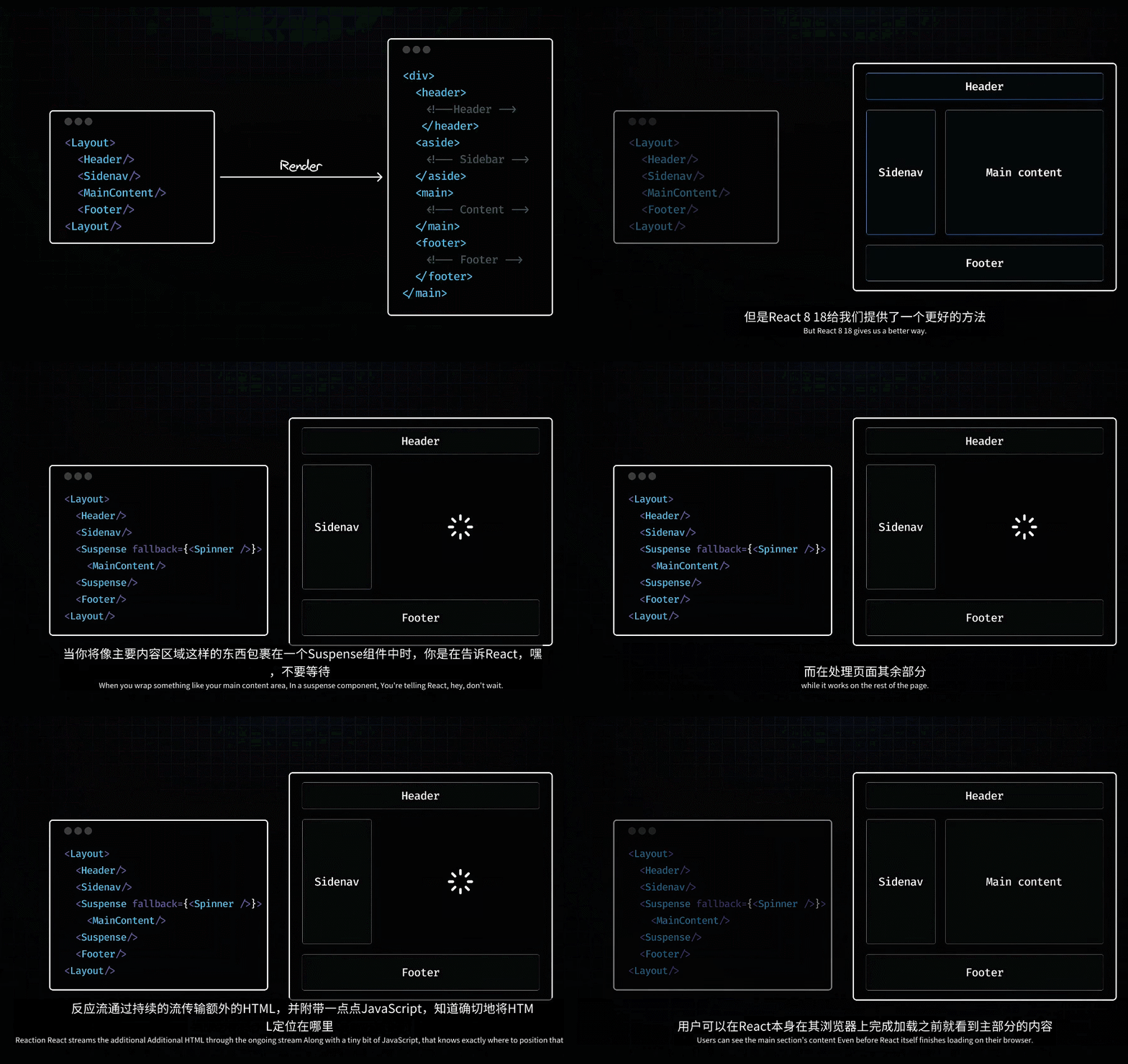
简要的说就是:使用<Suspense>包裹住渲染比较慢的部分,那么react不会等待这部分渲染完成,而是以stream的方式渲染其余部分,这一部分就会显示一个spinning样式。当这一部分的数据准备好时,react streams the additional html through the ongoing stream along with some javascript that does exactly to the html.

但还存在一个问题,只有js加载完了之后用户才能开始交互,如果js部分很大,用户还是需要等待。

此时可以使用React.lazy来将main section里面的代码与其它部分的代码隔离开来。

使用了React.lazy,这样就可以做到选择性的hydration。

这是lazy和suspense共同起作用之后的效果:
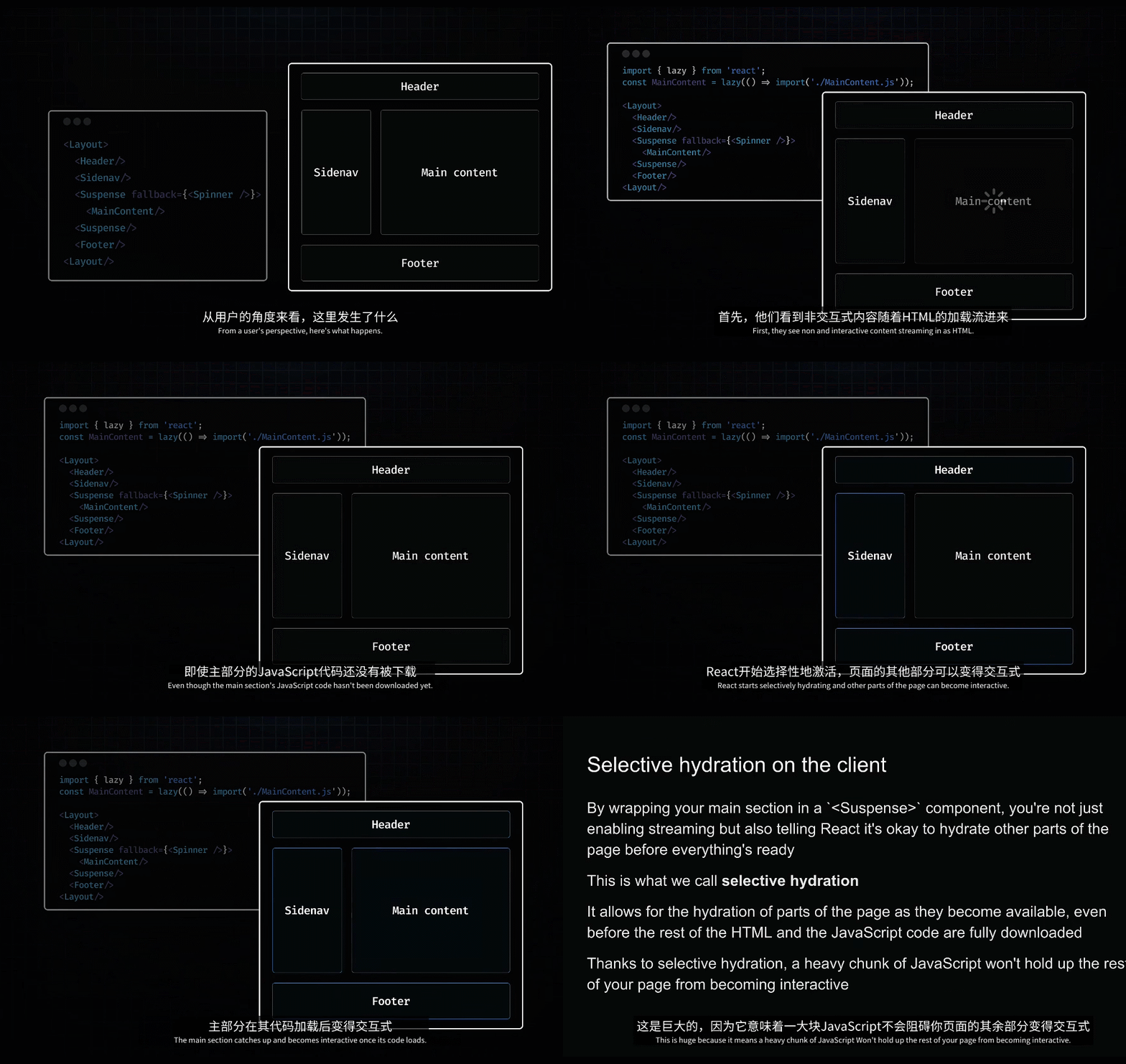

selective hydration同时解决了之前SSR遇到的第三个问题:hydrate the entire page to interact。
1、react会先hydrate那些没有使用React.lazy的组件。
2、如果处于awaiting hydration期间,react会根据用户的交互优先hydrate有交互的组件。

以下是流程说明:
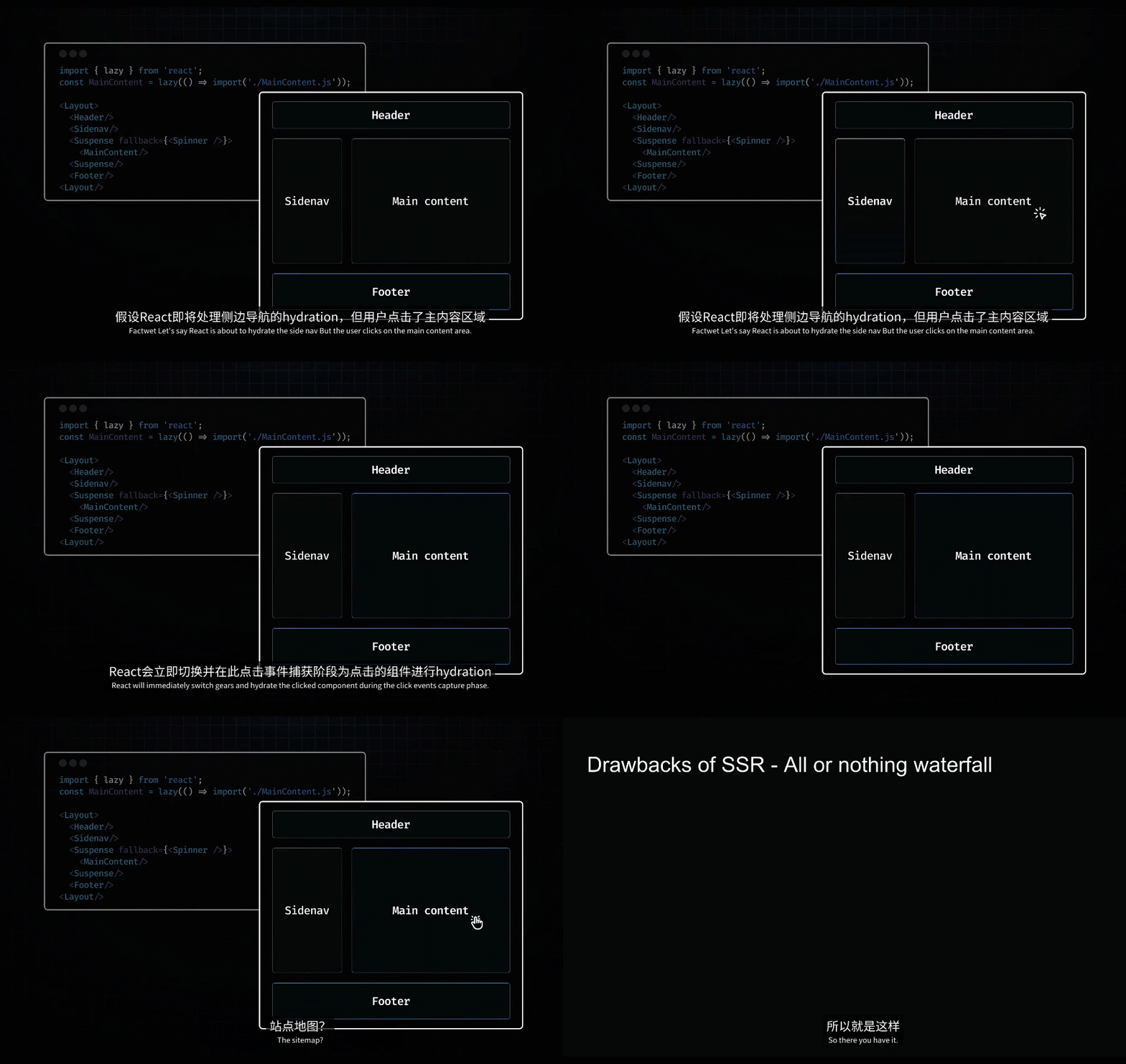
react18的new features解决了传统SSR的三个问题。

但是Suspense SSR还是存在3个问题:
1、用户最终都要下载整个项目的代码,代码量其实还变大了。

2、不必要的hydration会延迟交互

3、我们没有利用好server,最终还是让用户的设备承担起了大部分js工作

51-React Server Components
Suspense SSR还是存在问题,所以react为我们提供了 RSC ,来解决。

RSC引入了双组件模型 dual-component model,看上去就很熟悉了,client component和server component。

client component和server component并不是它们的功能来区分的,而是基于它们的执行环境和它们设计用来交互的具体系统。

1、client components
首先说一下client components,就是我们很熟悉的react components。

这里有一句话:but they can also be rendered to HTML on the server(SSR)。这句话该怎么理解?不是说它们变为了server components,而是指react给我们的一种优化策略,client components能够,同时也应该在server上运行一次以获取更好的性能,这部分应该是react框架帮助我们做的。

client components能够使用client environment的所有功能。

2、server components


server components有以下8个好处:
1、打包体积更小

2、直接连接服务端的资源

3、增强了安全性

4、提高数据请求性能

5、缓存

6、更快的初始化page加载速度,更快的内容绘制

7、SEO更好

8、有效的流

最后总结一下server component:


最后总结以下RSC:

RSC和nextjs是什么关系呢?
nextjs是建立在RSC architecture之上的,所以RSC的好处,使用nextjs就可以全部得到了。

真的是需要感谢老师,帮忙把整个react的演变过程讲解清楚了。我之前学习了react route v6,里面见到过这种写法,就是在server components里面进行data fetching,但就是不知道为什么要这么做?怎么做的好处在哪里?
这几节课要多看几遍,直到自己能够复述出来。
52-Server and Client Components
用案例来学习server components和client components,新建一个项目npx create-next-app rendering-demo。
1、server components
nextjs中所有的组件默认都是server component。
新建一个app/about/page.tsx。
xxxxxxxxxx61// app/about/page.tsx23export default function AboutPage() {4 console.log("this is about page");5 return <h1>About page</h1>6}访问这个页面,查看console输出的内容,可以看到前面有一个server的图标,说明这个component是server component。

server components can't maintain state, because they run on the server, where browser-based state management doesn't exist.
服务端组件无法维护状态,因为它们在服务器上运行,在哪里基于浏览器的状态管理并不存在。
2、client components
现在app/page.tsx里面新建一个Link链接。这里不仅仅使用url来测试,还使用链接来做测试,因为链接是有作用的,后面可以看到。

新建一个app/dashboard/page.tsx,这个组件使用了useState。
xxxxxxxxxx181// app/dashboard/page.tsx23"use client";45import { useState } from "react";67export default function DashboardPage() {8 const [name, setName] = useState("");910 return (11 <div>12 <h1>Dashboard</h1>1314 <input type="text" value={name} onChange={(e) => setName(e.target.value)} />15 <p>Hello, {name}!</p>16 </div>17 )18}"use client";的作用是什么呢?

这里老师说了一句:the "use client" directive signals to nextjs that this dashboard component along with any components it imports, is intended for client-side execution.
重点是这里的along with any components it imports,就是说一个组件变成了client component,那么它里面引用的所有组件都会在client端进行渲染执行。
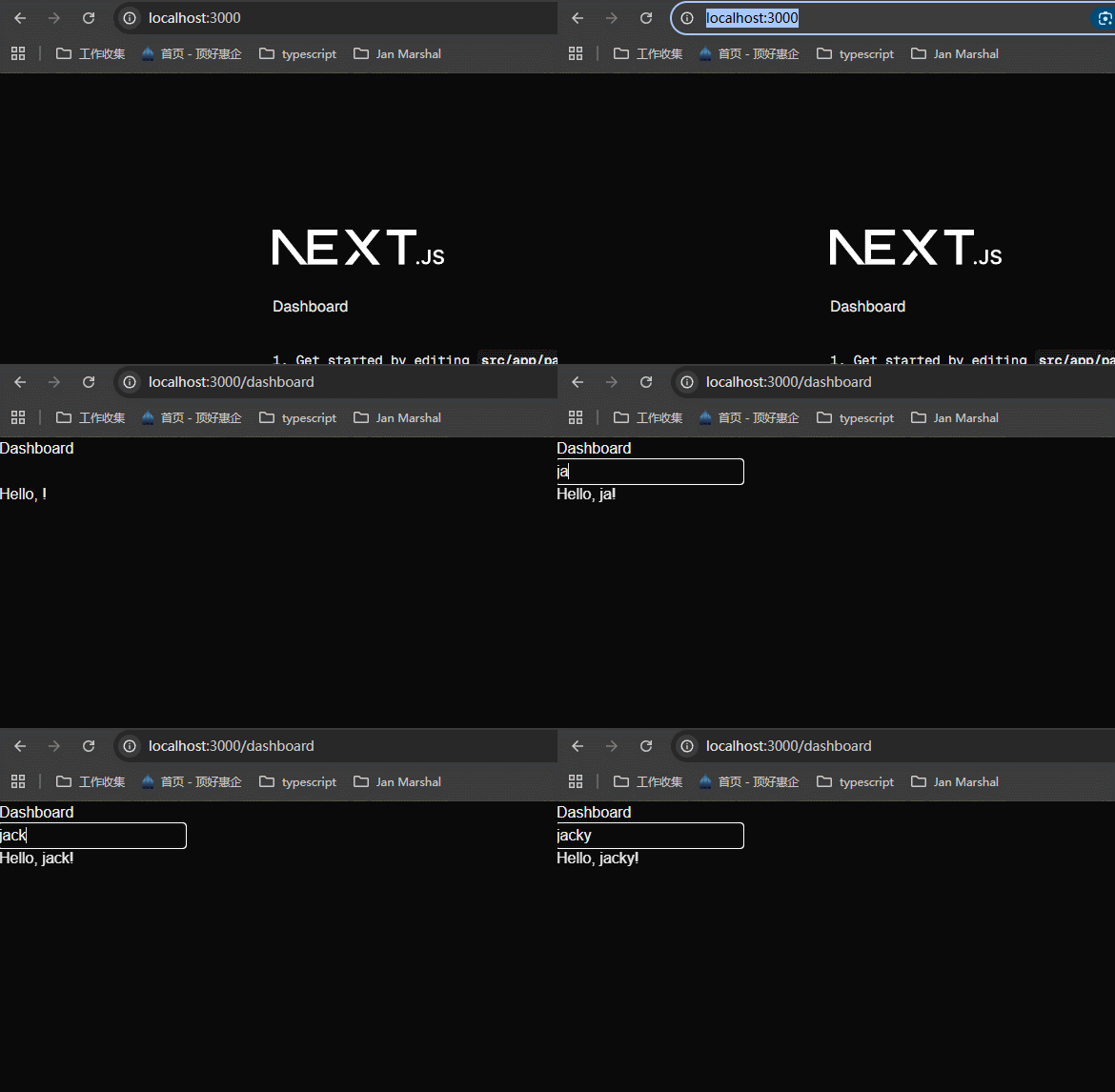
可以看到,在client components里面,useState是可以使用的。
a very important point about client components rendering behavior
在app/dashboard/page.tsx组件中,输出一些信息。

从首页的Link进入dashboard页面:
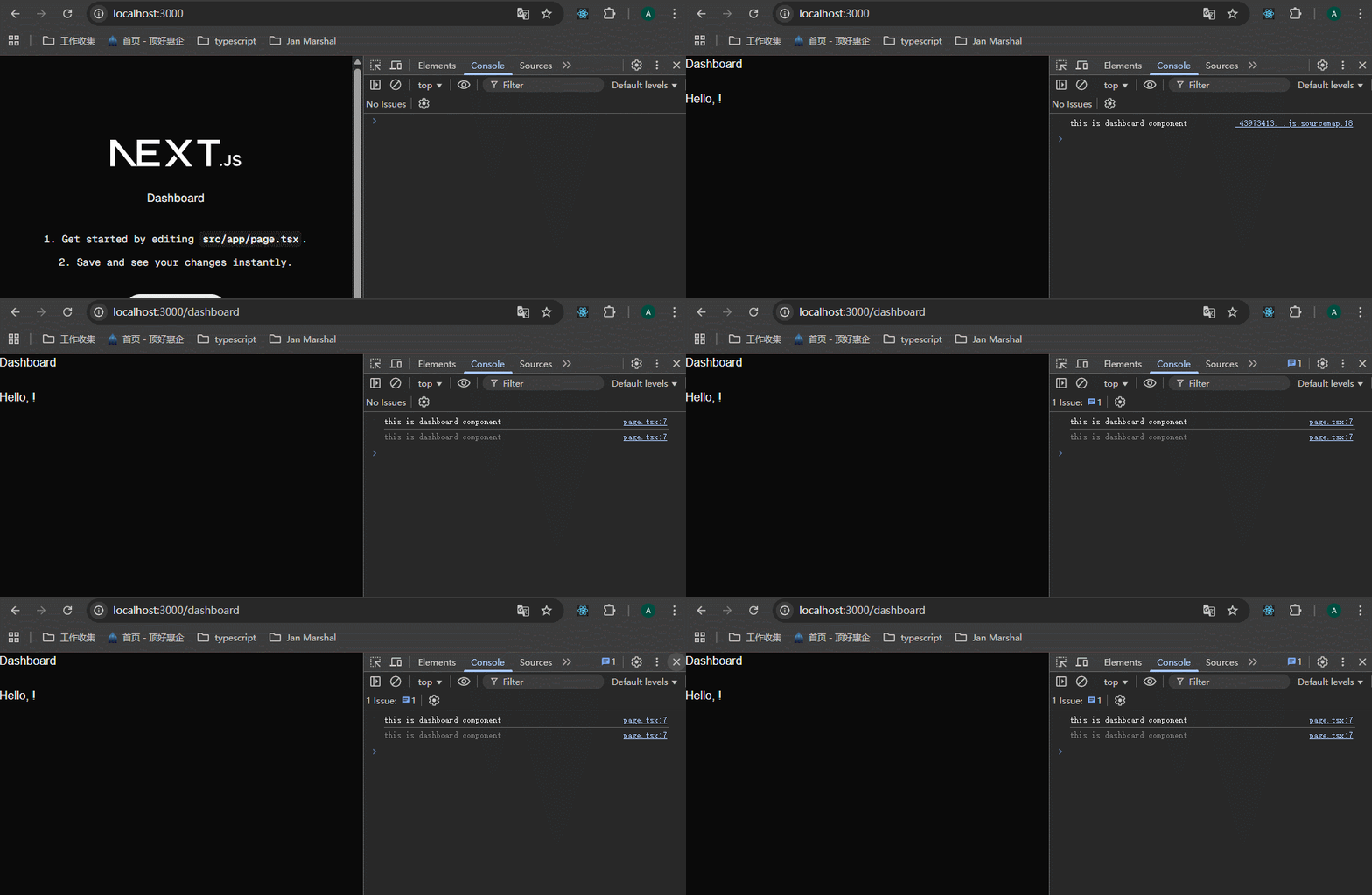
可以看到有两次输出,并且输出没有带server的标签。查看terminal里面,没有输出。
为什么有两次输出呢?因为nextjs使用了严格模式,在开发环境是有两次输出。
现在reload the page,会发现浏览器的console面板里面有两次输出,并且terminal里面也有输出:
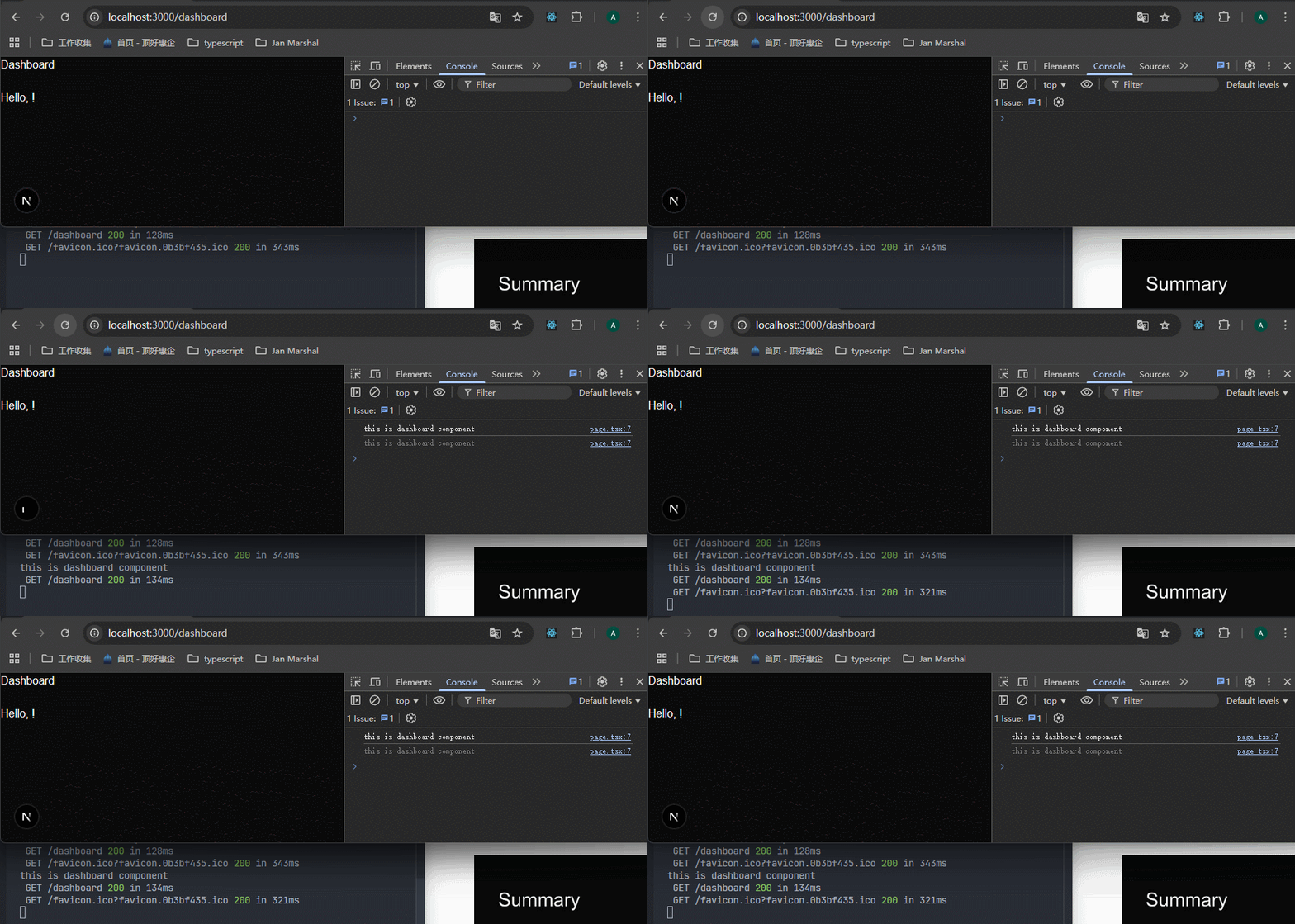
为什么在terminal里面会有输出呢?
因为当我们使用Link来导航时,dashboard component只在client-side进行渲染,我们可以从浏览器console面板看到。
当我们reload page时,the dashboard component is rendered once on the server to allow the user to immediately see the page's HTML content rather than a blank screen.

53-RSC Rendering Lifecycle
rsc:render server component。

下面,老师为什么讲解了RSC loading sequence(RSC loading 序列)以及RSC update sequence(RSC 更新序列),我分为几个gif录制了,效果不好就看视频。
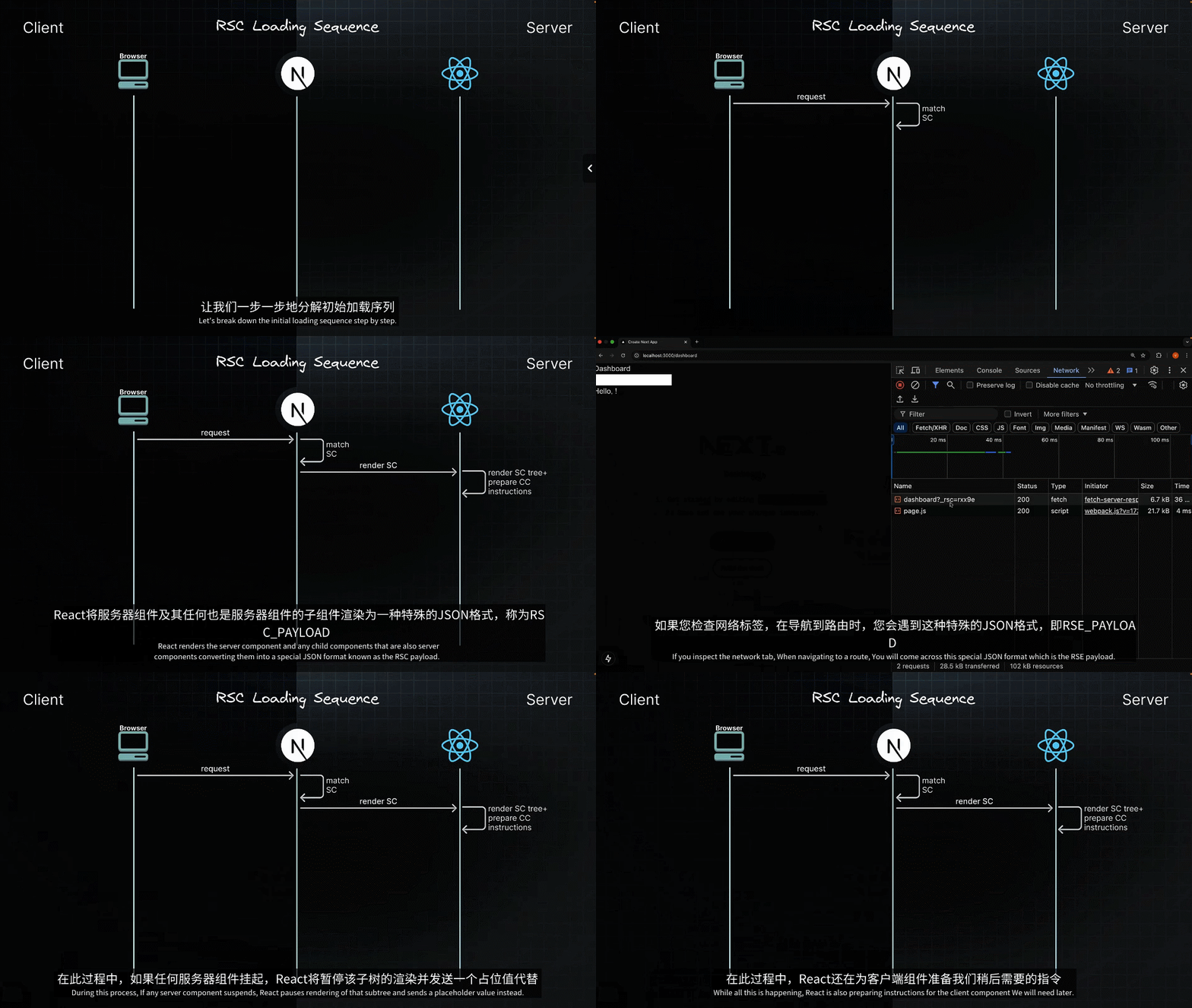
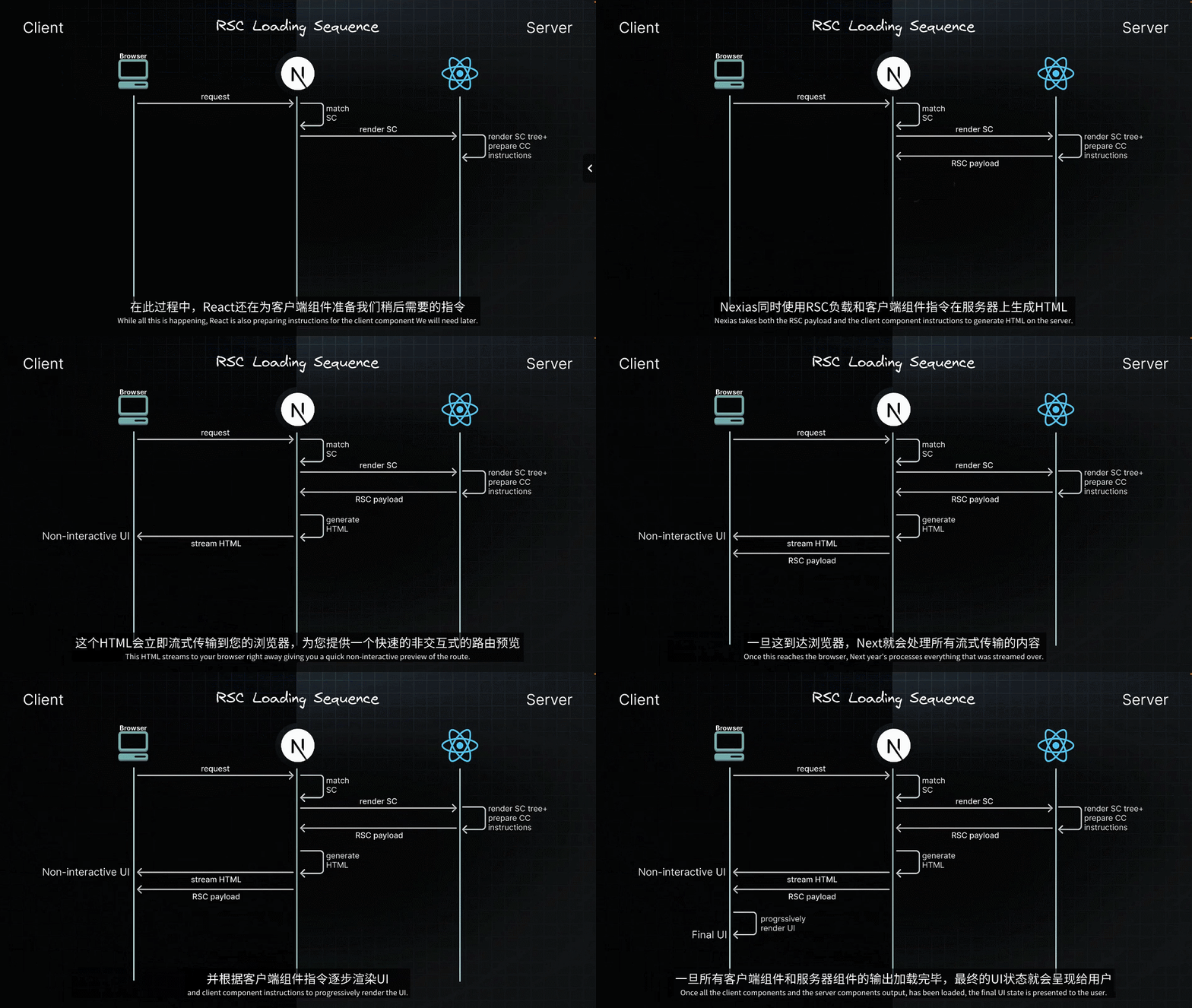
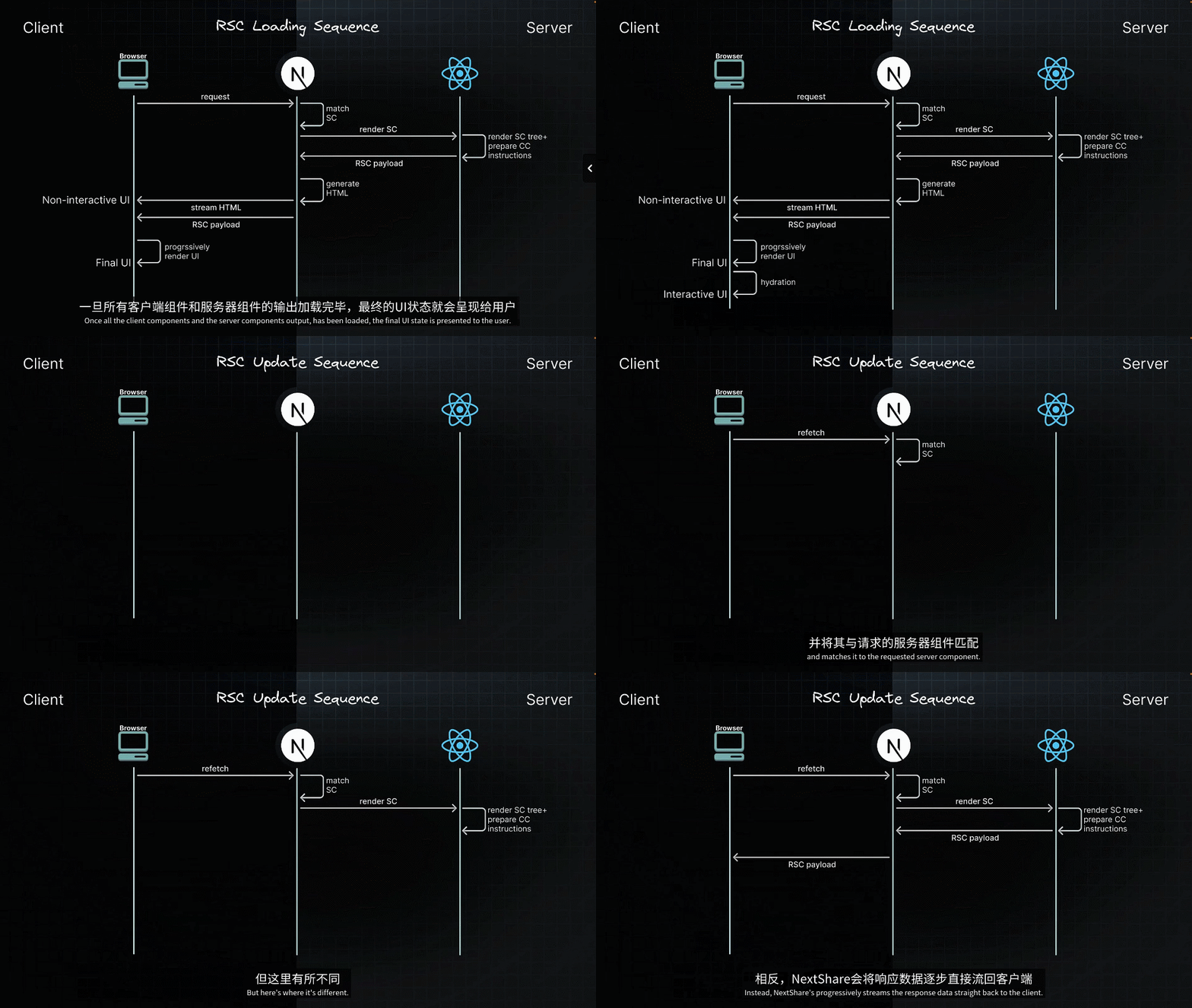
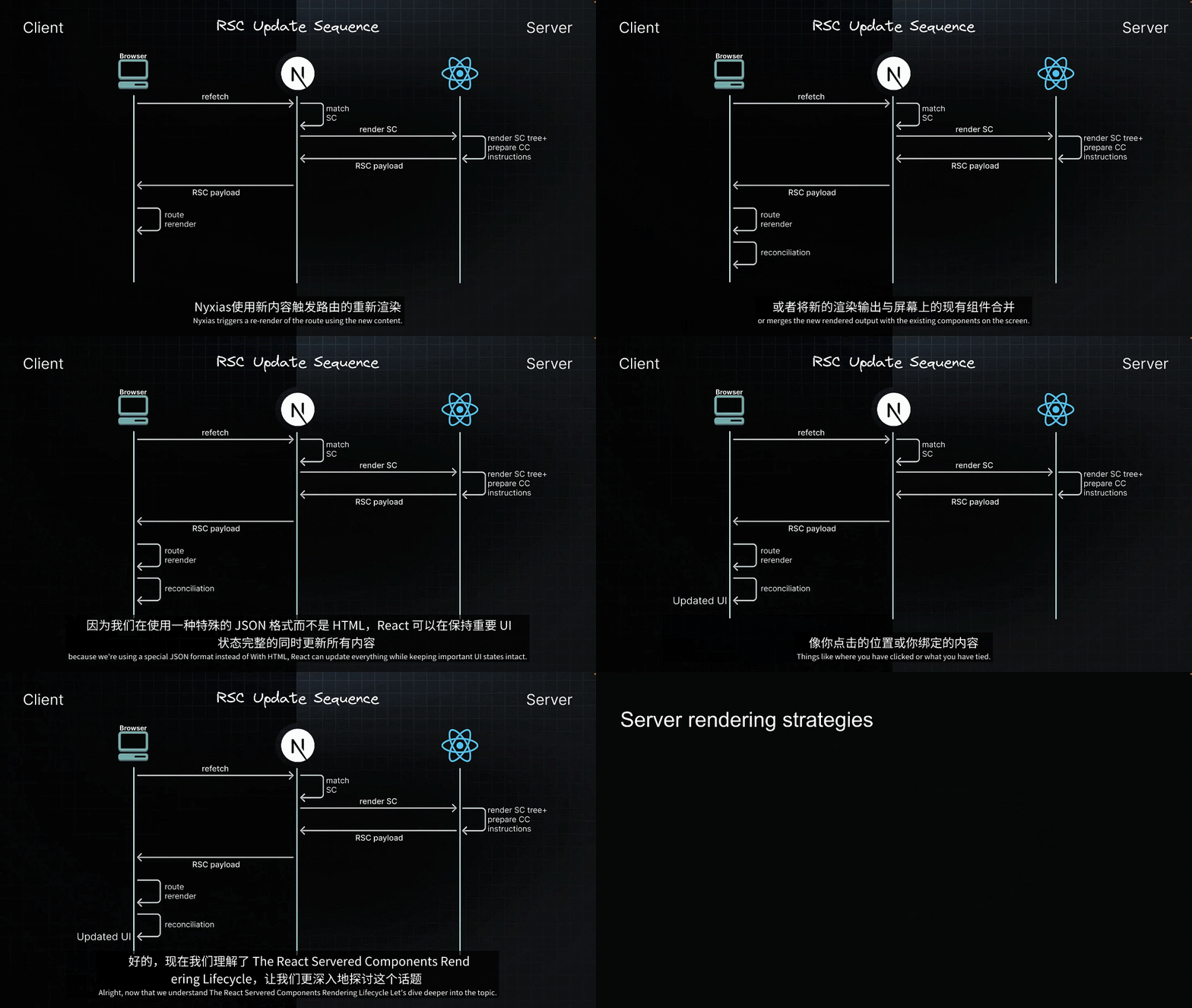
在nextjs中,there are three different ways rendering can happen on the server:

54-Static Rendering

static rendering有这么多好处,那么我们在nextjs里面应该怎么做才能实现呢?
答案是不需要做任何事情,因为static rendering 是app router的默认策略。

但是又引出了一个问题:我们在开发模式下,难道这种策略也能生效吗?这个不是发布到服务器上才能做到吗?

答案是这样的:运行npm run dev,你会看到项目里面的一个.next目录,真正运行的就是这个目录所在的项目。在开发环境,每次请求page的时候,都会执行pre-rendered。
在app/page.tsx里面添加一个<Link href="/about">About</Link>标签,并且在about/page.tsx里面添加显示当前时间:
xxxxxxxxxx61// app/about/page.tsx23export default function AboutPage() {4 console.log("this is about page");5 return <h1>About page{new Date().toLocaleTimeString()}</h1>6}将rendering-demo的.next文件夹删除,运行npm run build。你会看到这些:

这里给出了加载相应的页面所需要的JS文件的体积。同时在每个route的前面有一个空心圆圈,这表示static rendering,they are all pre-rendered at build time as static HTML.
再来看.next文件夹,重点关注server和static文件夹,

在server文件夹内,有一个app文件夹,which matches our application's route structure.
运行npm run start,清除浏览器缓存再访问:

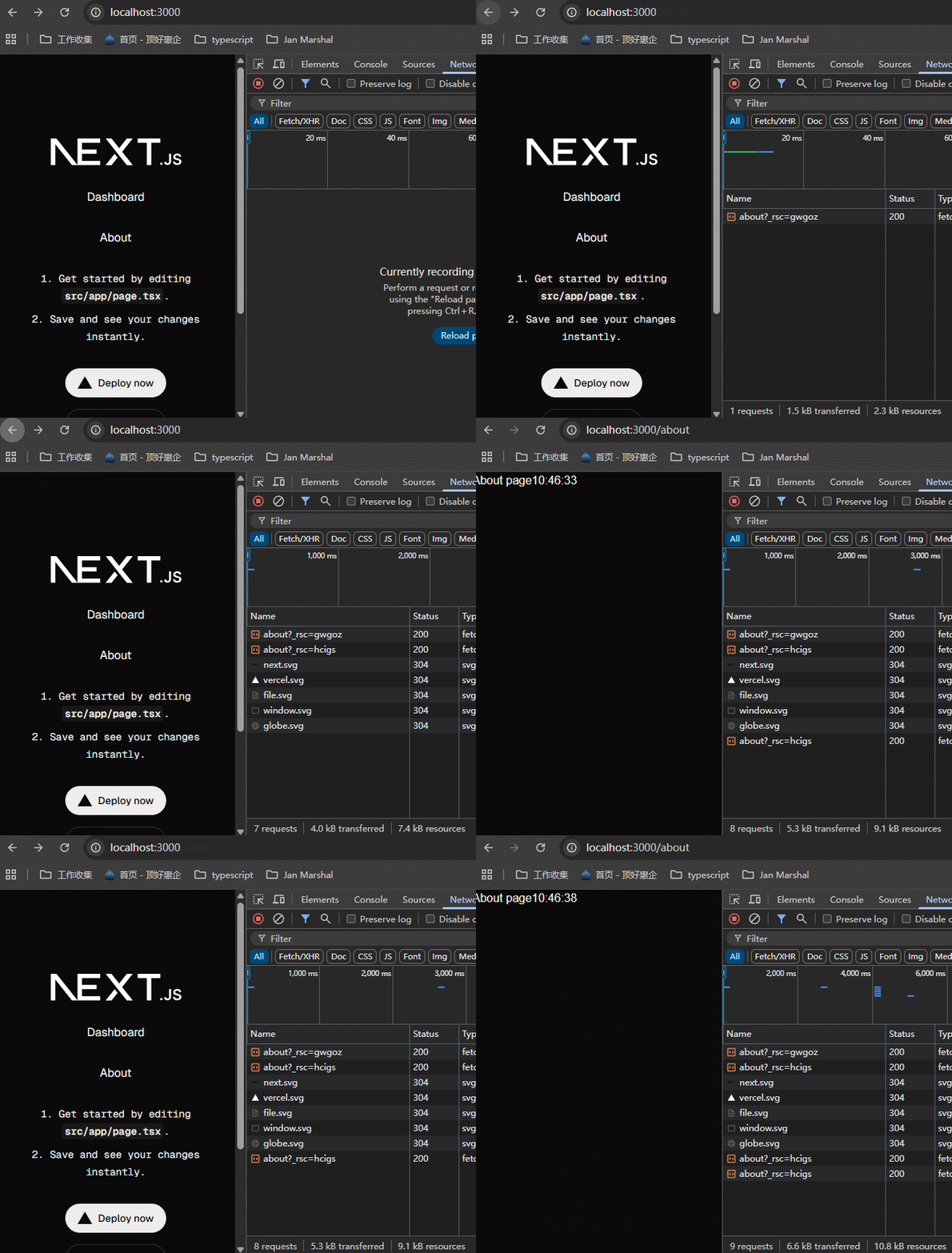
清除network里面的内容,访问/about和/dashboard,可以看到没有任何请求发生,这就是static rendering起作用了。
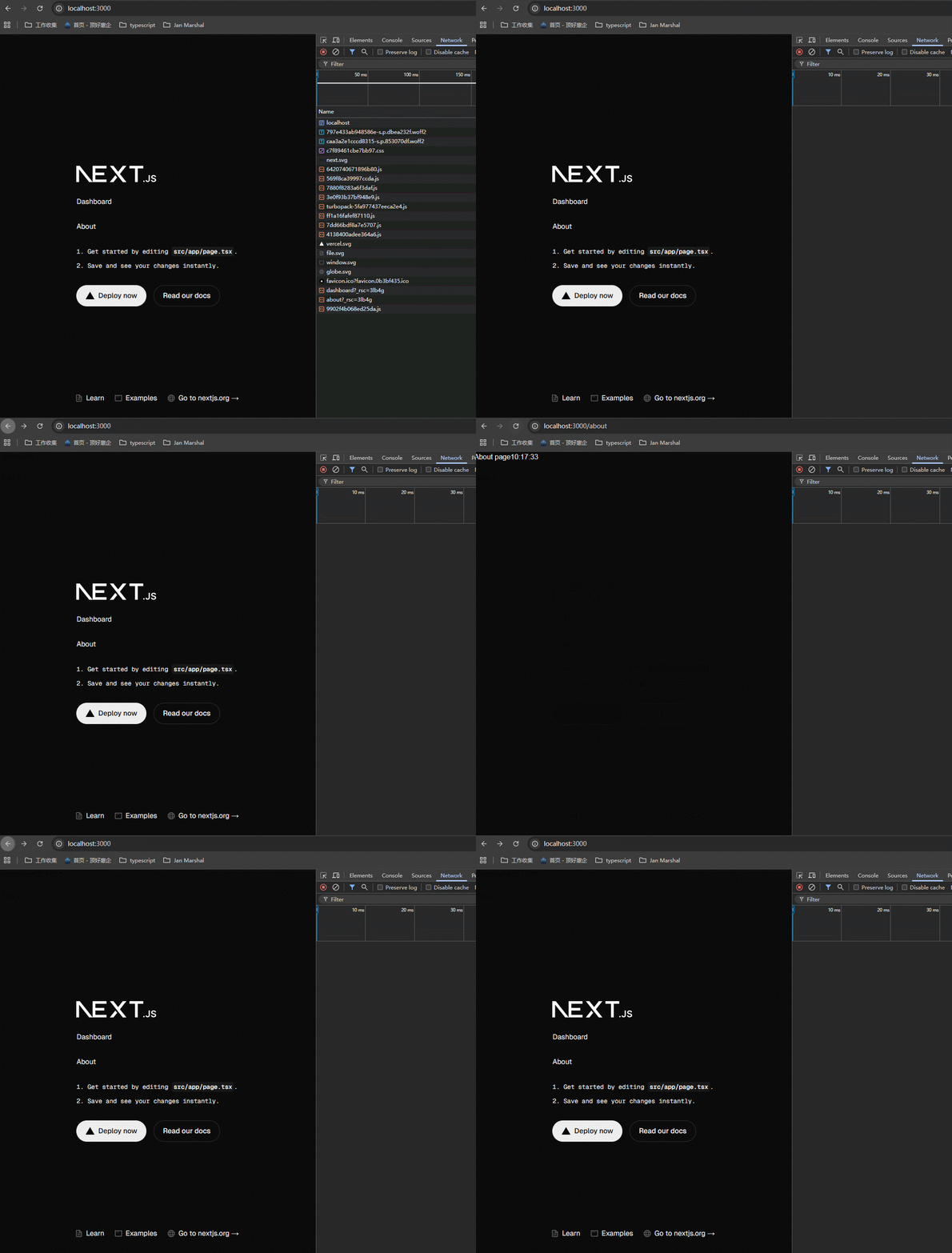
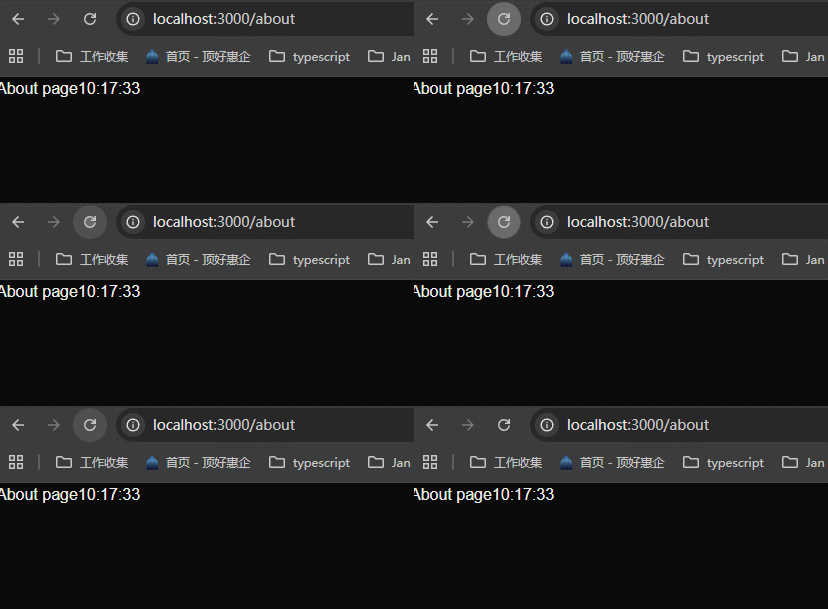
可以看到时间被固定在打包的时候了,无论怎么刷新都没有效果。这种特性需要记住。
这里有一个疑问,就是我们访问的是/这个路由,为什么此时会加载/about和/dashboard里面的内容呢?这是因为nextjs用到了prefetching的技术。

这节课内容非常丰富,只能多看几遍视频来理解,重点是讲解了nextjs是怎么实现static rendering的。

55-Dynamic Rendering

问题:我们怎么告诉nextjs去dynamic render哪些页面呢?
答案是当nextjs探测到dynamic function或者dynamic API时,nextjs会自动切换到dynamic rendering。

以案例来说明:
在app/about/page.tsx文件里面使用cookie,来看是否会触发nextjs的dynamic rendering。
xxxxxxxxxx101// app/about/page.tsx2import { cookies } from "next/headers";34export default async function AboutPage() {5 const cookieStore = await cookies();6 const theme = cookieStore.get("theme");7 console.log(theme);8 console.log("this is about page");9 return <h1>About page{new Date().toLocaleTimeString()}</h1>10}清除.next文件夹,运行npm run build,查看输出:

可以看到/about前面是一个f,这个意思下面给出了,这是动态渲染的。接着我们查看.next/server/app文件夹里面,并没有about.html文件,说明这个文件不是在build的时候创建的,而是会动态渲染。

运行npm run start,可以看到不管是page reload还是使用Link来访问/about,Networks面板里面都会有数据返回,页面时间会变化,并且terminal里面也会有输出,这就是dynamic rendering。
下面是dynamic rendering的总结:

如果不使用dynamic functions或者dynamic API,也可以将一个route变为dynamic rendering。方法就是在page页面上添加export const dynamic = "force-dynamic";。

56-generateStaticParams
这一节的案例是说:
新建一个products页面展示productList,然后动态渲染productDetail,此时会用到[id]/page.tsx,此时的详情页面都是dynamic rendering。
由于productList里面固定有3个product,我想把这3个的详情页面做成static rendering,性能会更好一些,该怎么做?这其实有实际例子的,比如说网站里面一些固定的内容、固定的头条之类的。
下面是实现的方法,用generateStaticParams()来实现。

新建app/products/page.tsx,app/products/[id]/page.tsx。
xxxxxxxxxx141// app/products/page.tsx23import Link from "next/link";45export default function ProductsPage() {6 return (7 <>8 <h1>Products page</h1>9 <Link href="/products/1">Product 1</Link>10 <Link href="/products/2">Product 2</Link>11 <Link href="/products/3">Product 3</Link>12 </>13 );14}xxxxxxxxxx101// app/products/[id]/page.tsx23export default async function ProductPage({4 params,5}: {6 params: Promise<{ id: string }>;7}) {8 const { id } = await params;9 return <h1>Product {id} details</h1>;10}运行npm run build,npm run start,注意看每次进入详情界面的时候,都会动态渲染:

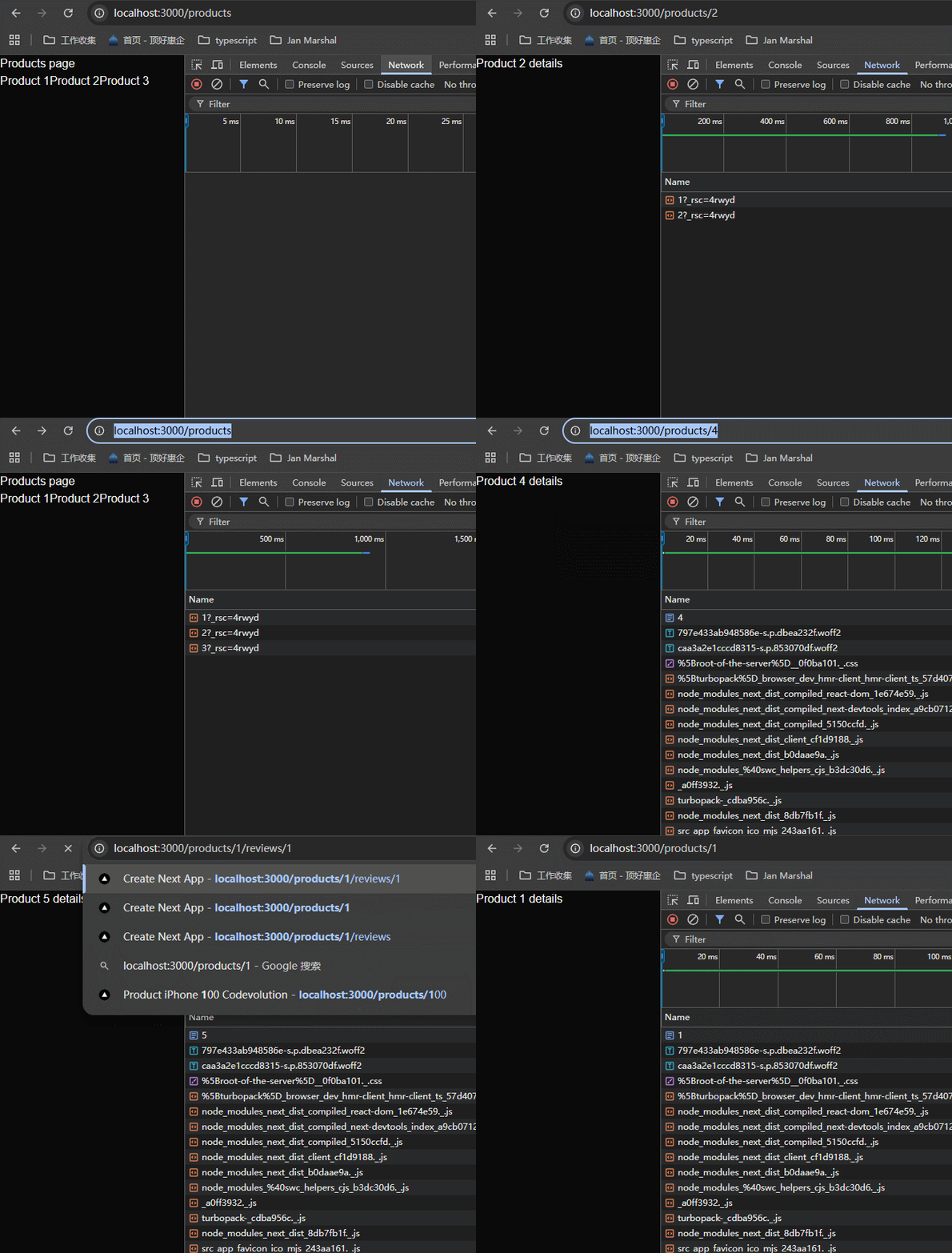
但是product1、2、3是固定的,我想把这三个做成static rendering。需要使用generateStaticParams指定具体哪些参数值。
xxxxxxxxxx151// app/products/[id]/page.tsx23// 返回的是数组,id就是动态参数的名称4export async function generateStaticParams() {5 return [{ id: "1" }, { id: "2" }, { id: "3" }];6}78export default async function ProductPage({9 params,10}: {11 params: Promise<{ id: string }>;12}) {13 const { id } = await params;14 return <h1>Product {id} details {new Date().toLocaleTimeString()}</h1>;15}重新打包:

注意看出现了一种新类型SSG。这就是生成的静态渲染文件。
重新运行看一下:
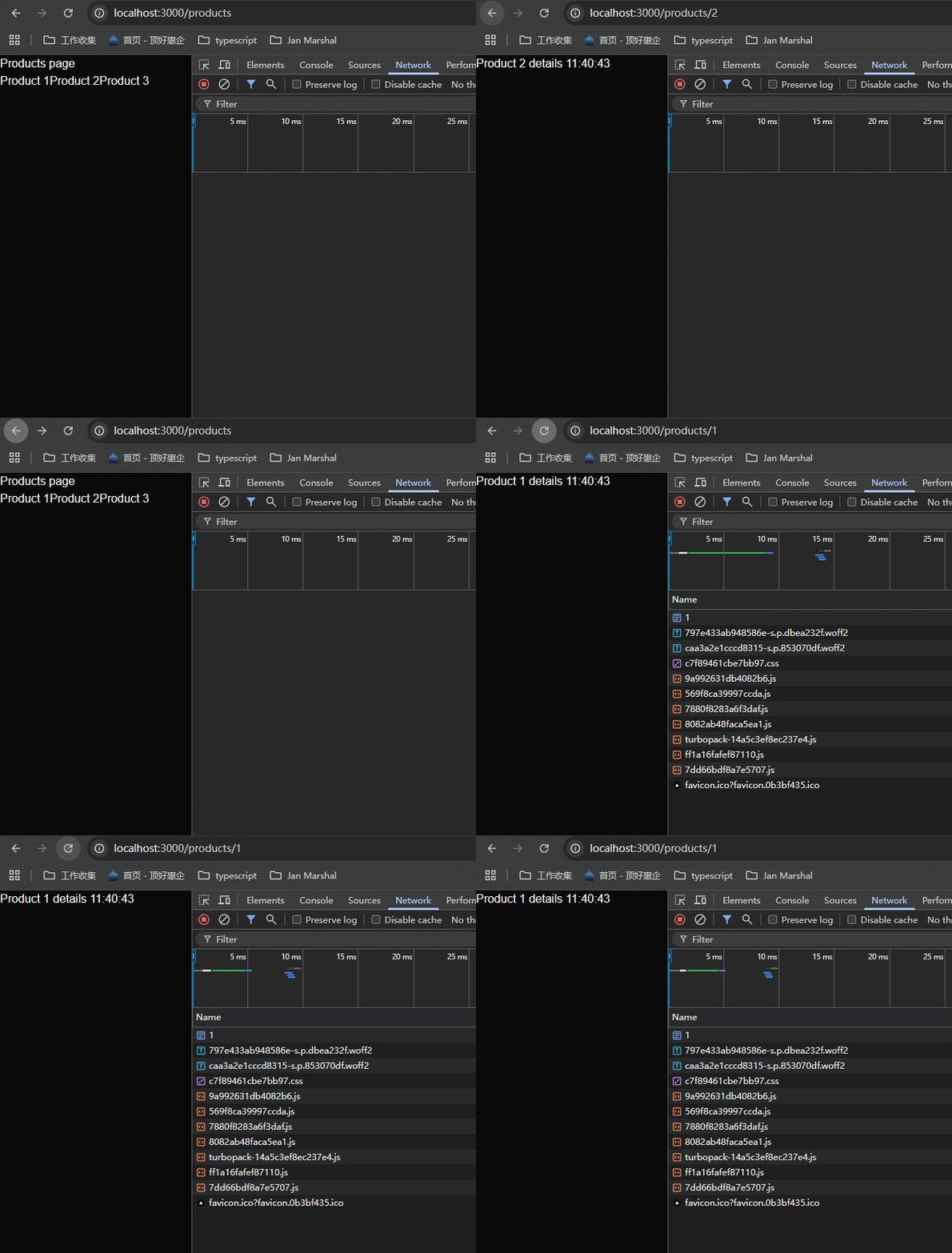
可以看到product1、2、3是静态渲染,page reload之后,时间也不会改变。
我这里有一个问题了,如果参数是4、5、6等等别的数字呢?会怎么样?下一节课会学习到,nextjs在运行时静态渲染它们。
那么如果是多个参数呢?首先路由结构必须是这样的/products/[categoryId]/[productId]/page.tsx,其次generateStaticParams里面的数组对象,参数顺序要跟定义路由时保持一致。

57-dynamicParams
上节课我们学习了generateStaticParams,并且制定了id为1、2、3时为静态渲染。那些没有指定的id值呢?比如说4、5等等,nextjs statically renders them at runtime。nextjs在运行时静态渲染它们。
这是什么意思呢?注意看我们打包后的.next/server/app/products,里面只有1、2、3的html页面。

当我们访问/products/4之后,这里面会生成一个4.html文件。并且刷新浏览器,时间是不变的。以此类推。
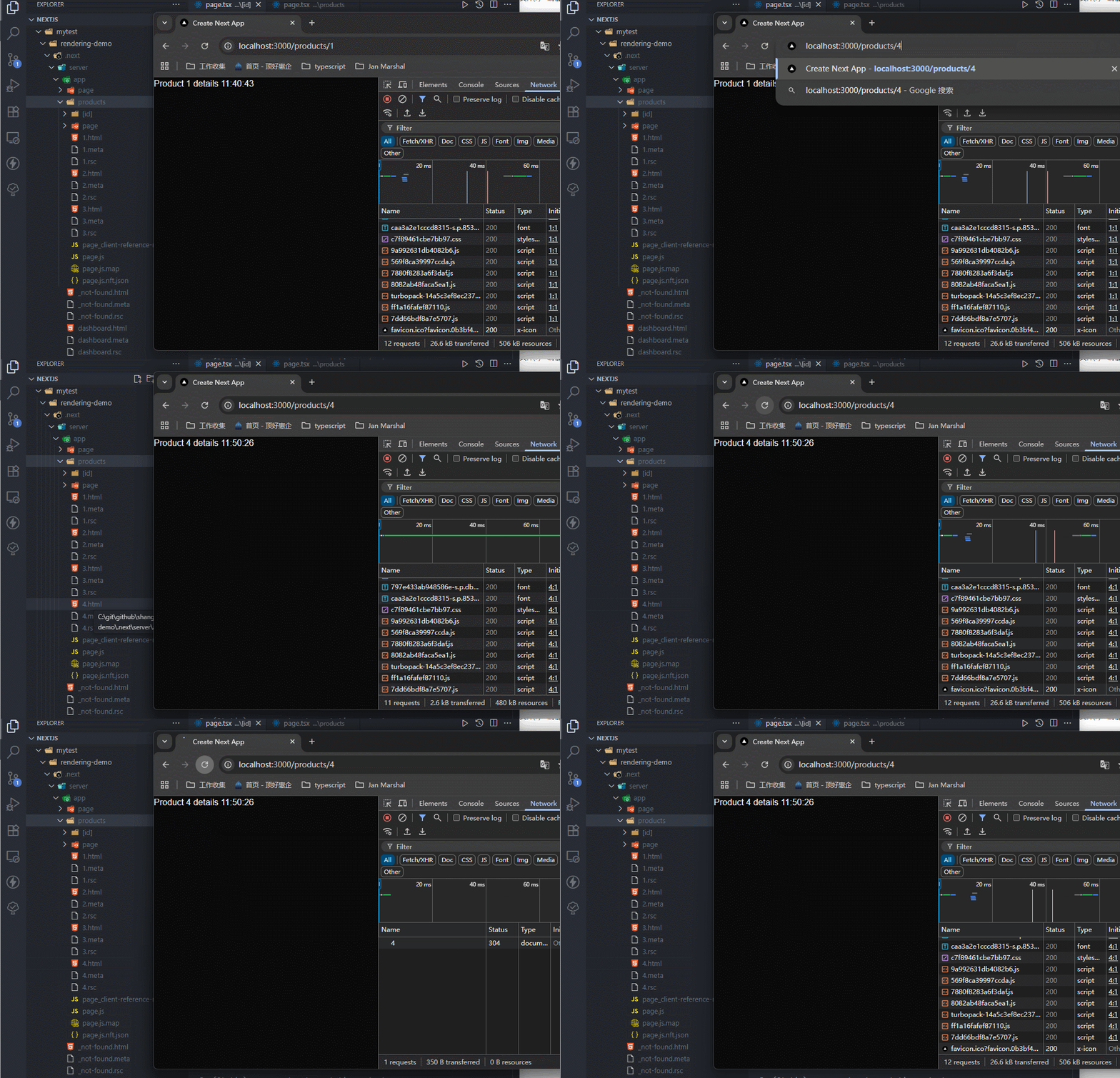
原因如下:

generateStaticParams()方法在使用时,nextjs默认设置dynamicParams为true,表示允许没有在generateStaticParams中列出的参数访问时,生成静态渲染文件,就像上面访问/products/4时发生的那样。
那么如果dynamicParams设置为false,那么访问没有在generateStaticParams中列出的参数访问时,nextjs会生成404页面返回。
试一下,删除.next,重新打包运行:

可以看到返回404页面。
那这个参数在哪些情况下设置为true,哪些情况下设置为false呢?


58-Streaming


nextjs的app route里面集成了streaming这种渲染方式,需要使用<Suspense>标签。

创建/app/product-review/page.tsx,里面引入两个组件,这两个组件分别使用了2秒和4秒的延迟,这样来看效果。
xxxxxxxxxx141// /app/product-review/page.tsx23import ProductsPage from "../components/products"4import ReviewPage from "../components/review"56export default function ProductReviewPage(){7 return (8 <>9 <h1>Product review page</h1>10 <ProductsPage />11 <ReviewPage />12 </>13 )14}xxxxxxxxxx101// rendering-demo/src/app/components/review.tsx23export default async function ProductsPage() {4 const result = await new Promise((resolve, _) => {5 setTimeout(() => {6 resolve("heihei")7 }, 2000);8 })9 return <h1>Products Page</h1>10}xxxxxxxxxx111// rendering-demo/src/app/components/products.tsx23export default async function ReviewPage() {4 const result = await new Promise((resolve, _) => {5 setTimeout(() => {6 resolve("review")7 }, 4000);8 })910 return <h1>Review Page</h1>11}运行看一下:
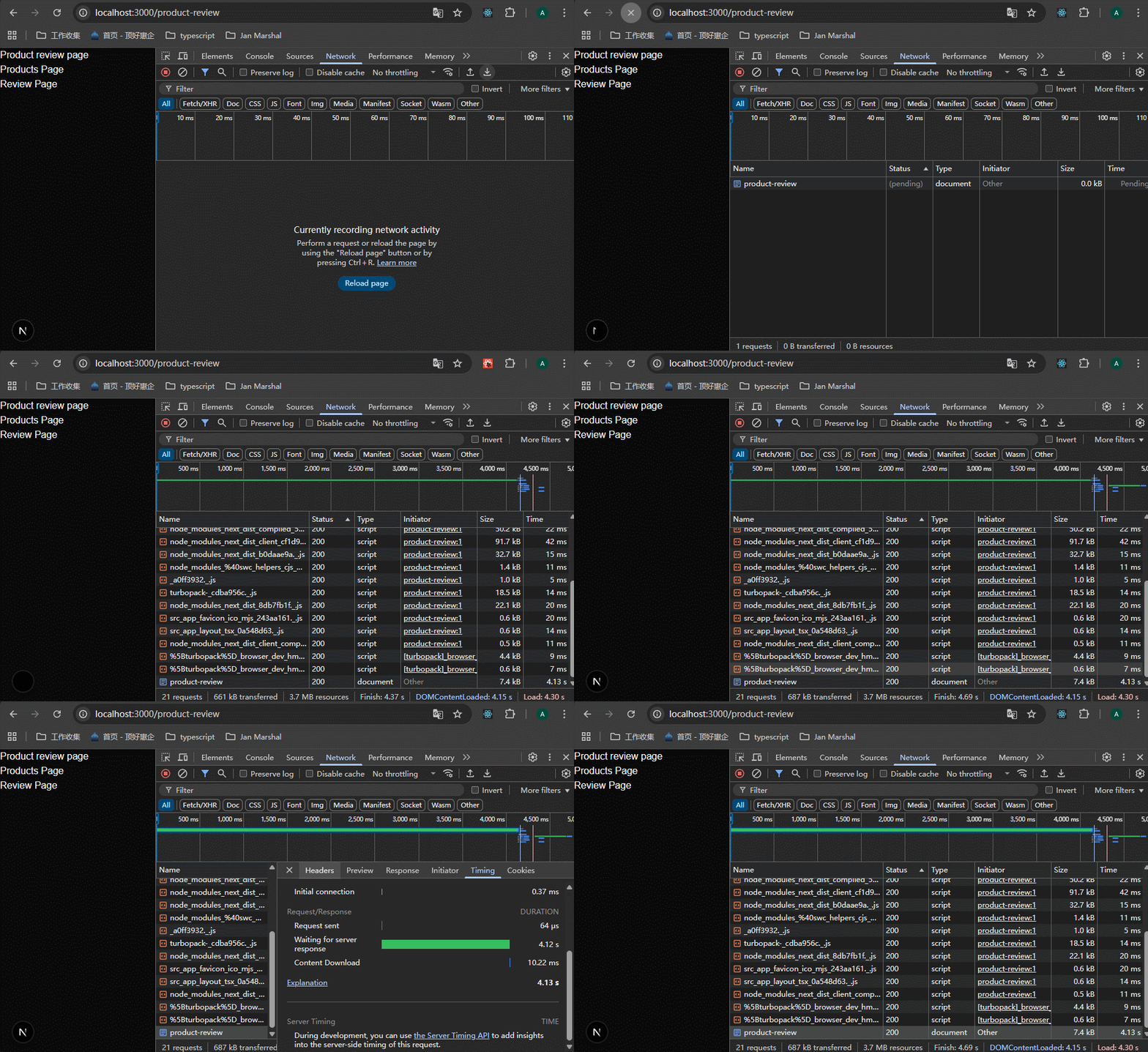
可以看到延迟了4秒多钟之后才加载完成。
we wrap the slow components with suspense, and nextjs handles the rest.我们只需要将加载慢的组件用<Suspense>标签包裹起来,nextjs就会使用streaming strategy来加载组件。
xxxxxxxxxx211// /app/product-review/page.tsx23import { Suspense } from "react"4import ProductsPage from "../components/products"5import ReviewPage from "../components/review"67export default function ProductReviewPage() {8 return (9 <>10 <h1>Product review page</h1>11 12 <Suspense fallback={<p>Loading product details...</p>}>13 <ProductsPage />14 </Suspense>15 16 <Suspense fallback={<p>Loading reviews...</p>}>17 <ReviewPage />18 </Suspense>19 </>20 )21}查看效果:
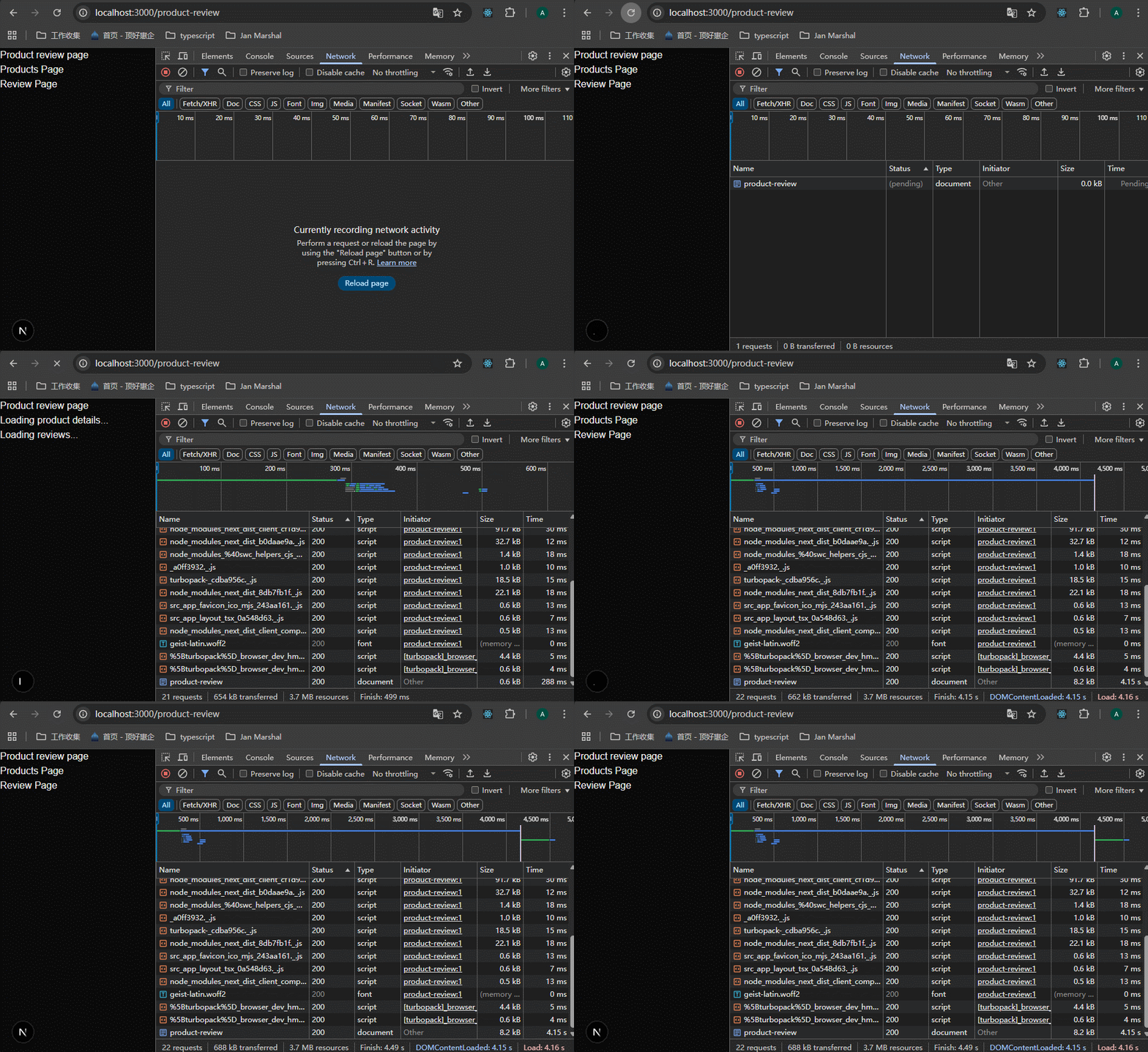
可以看到没有使用suspense包裹的组件先显示,使用suspense包裹的组件会先显示fallback的内容,加载完成后会显示完整内容。
59-Server and Client Composition Patterns
下面是server components和client components使用的一些场景:


60-Server-only Code
server only和client ony只是说一些代码最好只在server component或者client component里面使用,这些代码如果被错误使用,会造成泄密或者报错。
重点就是怎么防止程序员不小心用错。就是在编写阶段引入server-only或者client-only库,如果在错误的地方使用了server only或者client only的代码,在开发阶段就可以为我们探测到,提示我们。

一些js代码只需要在server上运行,如果不小心泄露到了client上面去就不好了,所以使用一个名为server-only的包,npm i server-only。
这个包的作用就是:如果有人不小心将这里面的代码引入到client components里面去,在项目构建的时候会报错(之前我们已经知道了,Next在dev的时候,也是有构建的,所以开发的时候也会报错)。

创建app/server-route/page.tsx,app/client-route/page.tsx,src/utils/server-utils.ts,分别在两个组件里面引入这个工具函数。这个serverSideFunction的本意是只在server上使用,但是这里就是模拟如果不小心将这个函数引入到了client components里面去,能不能正常使用?
xxxxxxxxxx121// rendering-demo/src/app/server-route/page.tsx23import { serverSideFunction } from "@/utils/server-utils";45export default function ServerRoutePage() {6 const result = serverSideFunction();7 return (8 <>9 <h1>Server Route {result}</h1>10 </>11 );12}xxxxxxxxxx141// rendering-demo/src/app/client-route/page.tsx23"use client";45import { serverSideFunction } from "@/utils/server-utils";67export default function ClientRoutePage() {8 const result = serverSideFunction();9 return (10 <>11 <h1>Client Route {result}</h1>12 </>13 );14}xxxxxxxxxx111// src/utils/server-utils.ts23export const serverSideFunction = () => {4 console.log(5 `use multiple libraries,6 use environment variables,7 interact with a database,8 process confidential information`9 );10 return "server result";11};可以看到在server component和client component里面,都可以正常使用函数。
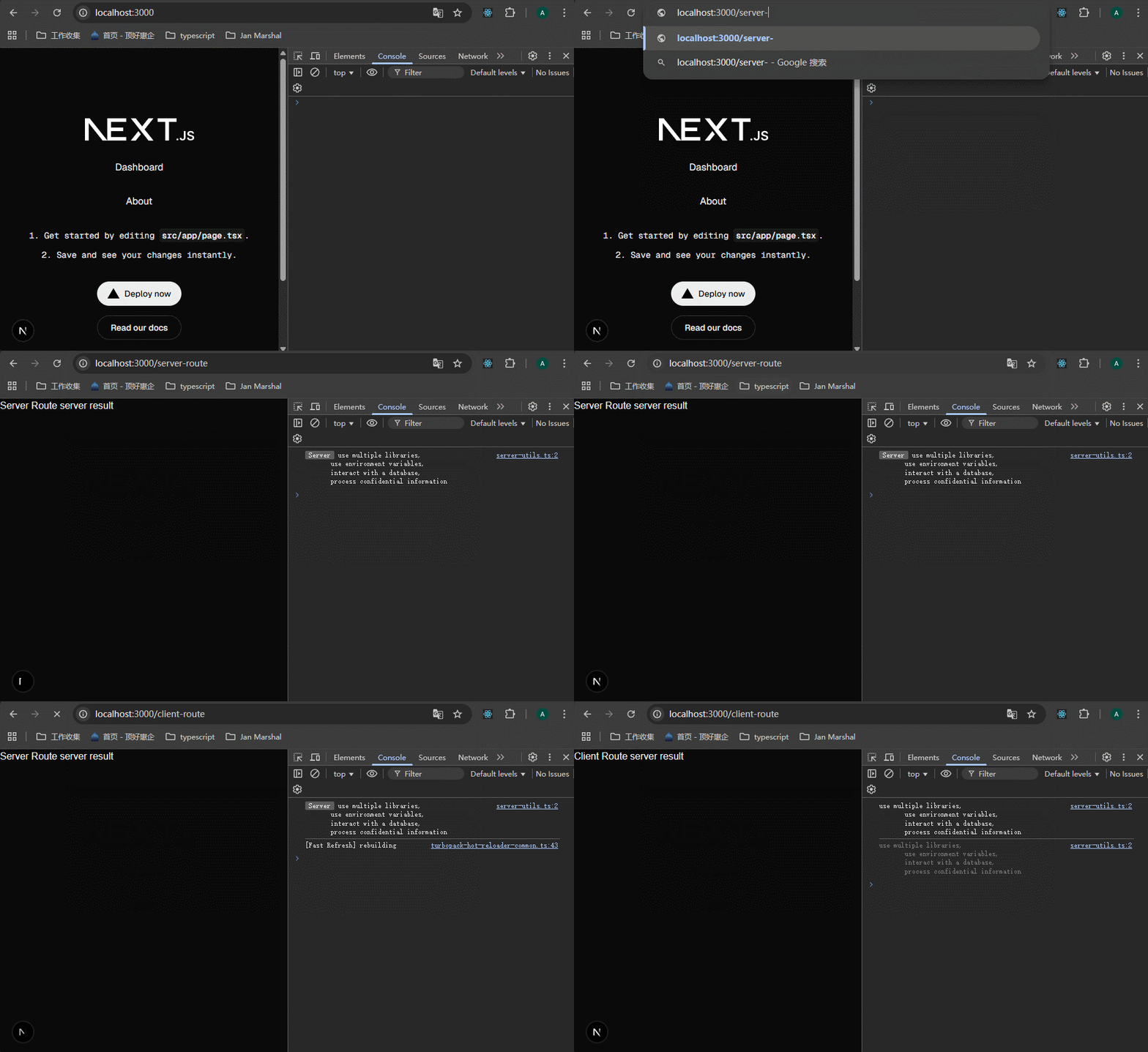
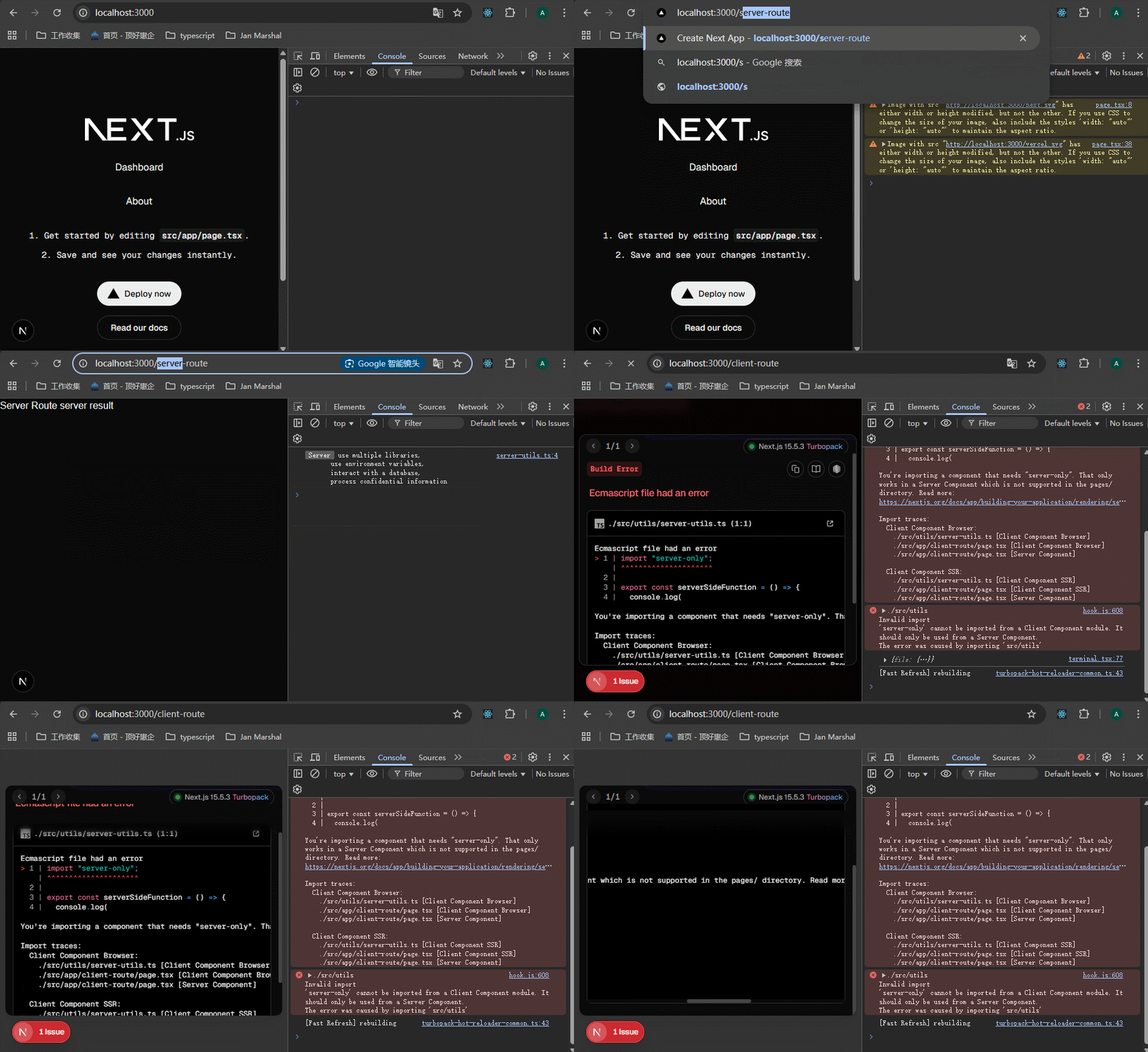
但是serverSideFunction这个函数我只想用在server端,怎么做?安装server-only这个库,然后在这个文件里面引入即可。
xxxxxxxxxx131// src/utils/server-utils.ts23import "server-only";45export const serverSideFunction = () => {6 console.log(7 `use multiple libraries,8 use environment variables,9 interact with a database,10 process confidential information`11 );12 return "server result";13}当发现client component里面使用这个函数的时候,nextjs就会报错:
61-Third Party Packages
react区分了server component和client component,但是大多数第三方包并没有跟上,应该都还是只有client component这一种类型的组件。那么当在nextjs的server components里面引入并使用这些第三方库的组件的时候,会报错。
解决办法是什么呢?将这些第三方组件,放到我们自定义的client component里面去,然后在我们的server components里面使用自定义的client component,这样就不会报错了。

下面以案例说明:
安装npm i react-slick slick-carousel @types/react-slick --force,在app/client-route/page.tsx里面引入轮播图。
xxxxxxxxxx321// app/client-route/page.tsx23"use client";45import React from "react";6import Slider from "react-slick";7import "slick-carousel/slick/slick.css";8import "slick-carousel/slick/slick-theme.css";910export default function ClientRoutePage() {11 const settings = {12 dots: true,13 };14 return (15 <div className="image-slider-container">16 <Slider {settings}>17 <div>18 <img src="https://picsum.photos/400/200" />19 </div>20 <div>21 <img src="https://picsum.photos/400/200" />22 </div>23 <div>24 <img src="https://picsum.photos/400/200" />25 </div>26 <div>27 <img src="https://picsum.photos/400/200" />28 </div>29 </Slider>30 </div>31 );32}xxxxxxxxxx111// src/app/globals.css23.image-slider-container {4 margin: 0 auto;5 width: 400px;6}78.image-slider-container .slick-prev:before,9.image-slider-container .slick-next:before {10 color: white;11}查看效果,第三方库的组件可以正常使用。
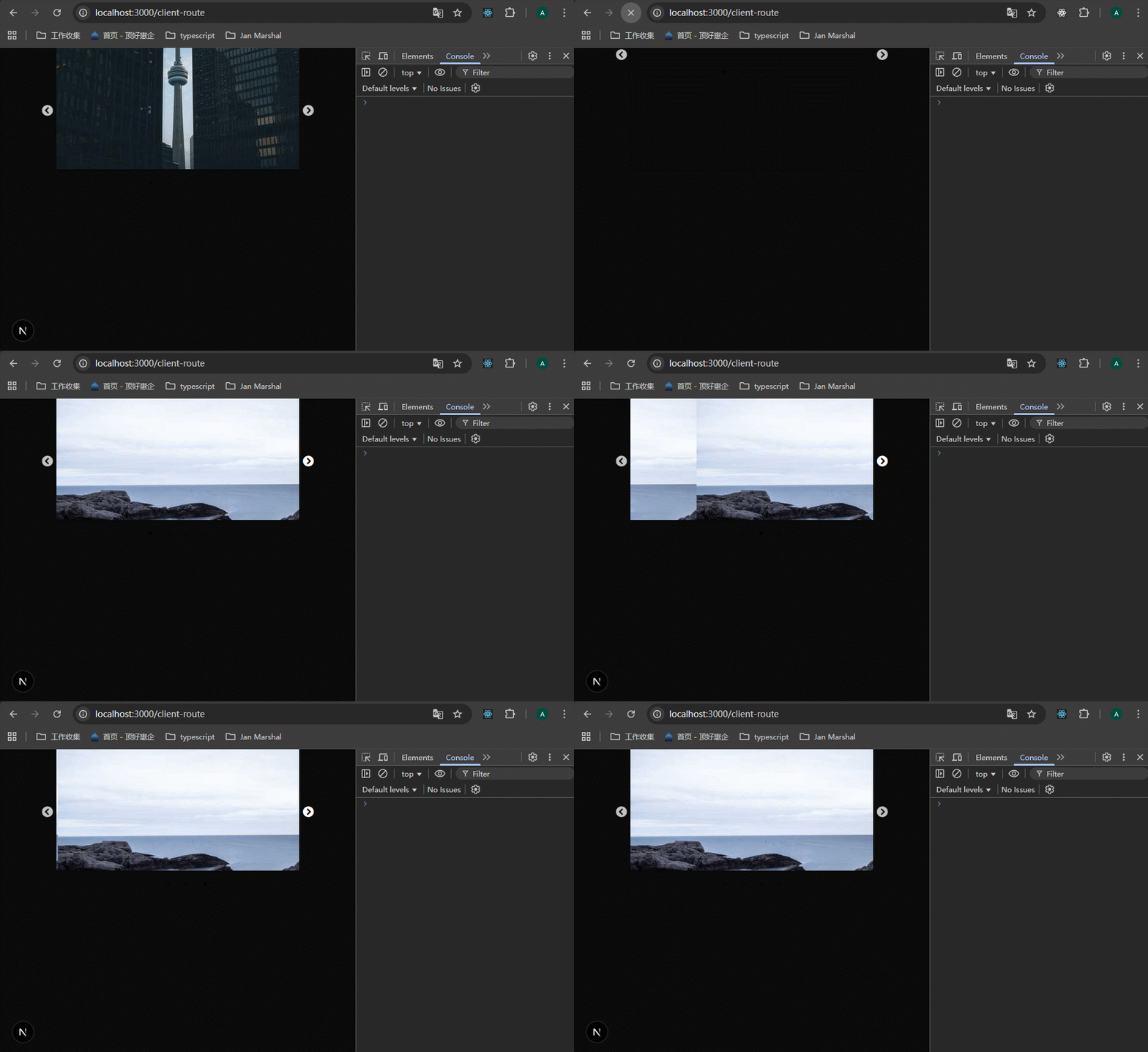
那么在server component里面可以正常使用吗?不用太复杂,直接将"use client";去掉,就可以模拟这种情况,看一下:

可以看到报错了。
怎么解决呢?将第三方库的代码包裹到自定义的client component里面,然后引用这个自定义的组件即可。
新建src/components/ImageSlider.tsx:
xxxxxxxxxx321// src/components/ImageSlider.tsx23"use client";45import React from "react";6import Slider from "react-slick";7import "slick-carousel/slick/slick.css";8import "slick-carousel/slick/slick-theme.css";910export const ImageSlider = () => {11 const settings = {12 dots: true,13 };14 return (15 <div className="image-slider-container">16 <Slider {settings}>17 <div>18 <img src="https://picsum.photos/400/200" />19 </div>20 <div>21 <img src="https://picsum.photos/400/200" />22 </div>23 <div>24 <img src="https://picsum.photos/400/200" />25 </div>26 <div>27 <img src="https://picsum.photos/400/200" />28 </div>29 </Slider>30 </div>31 );32}然后在server-route/page.tsx里面引用这个组件:
xxxxxxxxxx141// app/server-route/page.tsx23import { serverSideFunction } from "@/utils/server-utils";4import { ImageSlider } from '../components/ImageSlider'56export default function ServerRoutePage() {7 const result = serverSideFunction();8 return (9 <>10 <h1>Server Route {result}</h1>11 <ImageSlider />12 </>13 );14}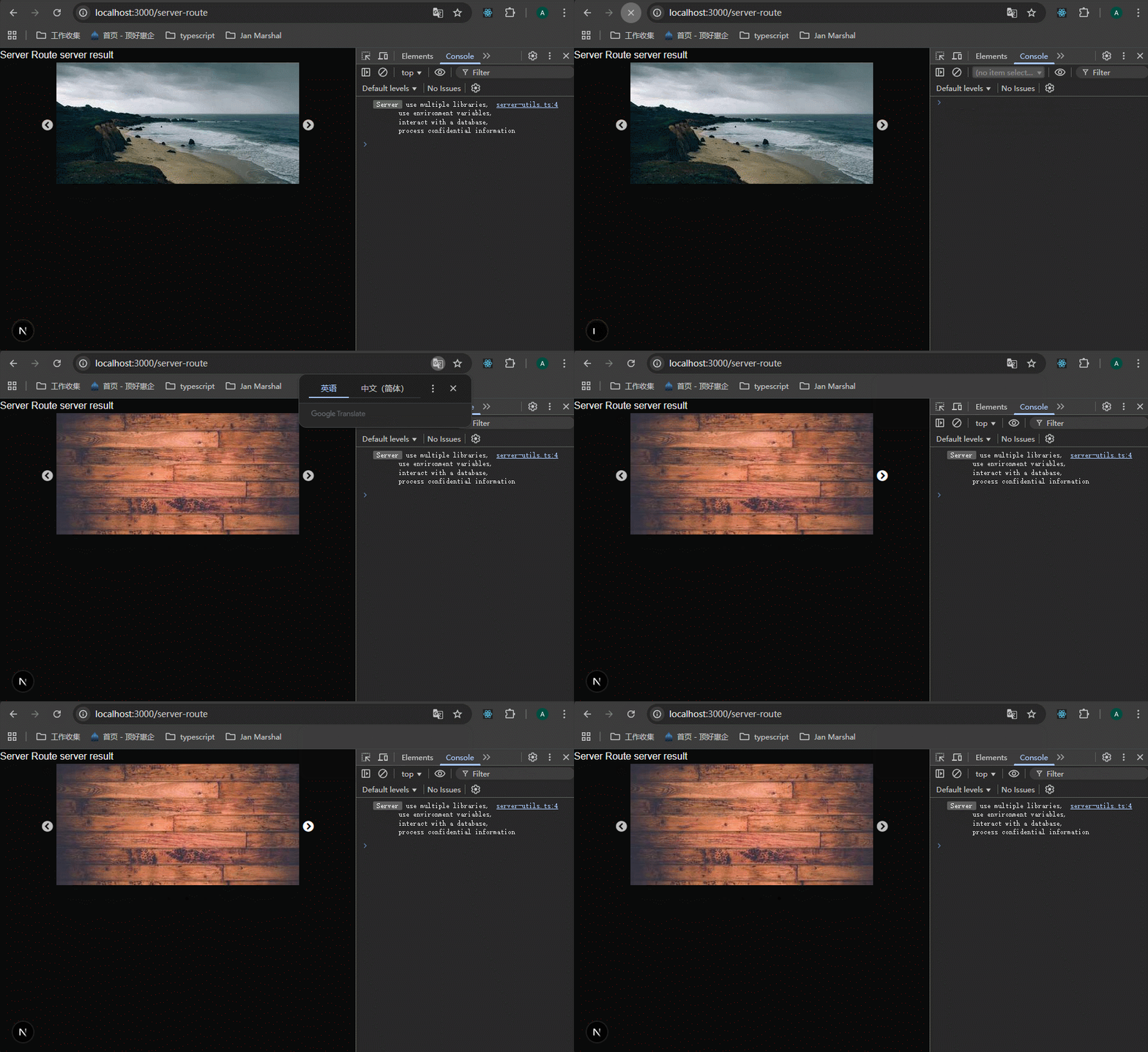
62-Context Providers
这一节课看了老师的案例,我其实有一个疑问,就是provider提供了全局的上下文,但是还是需要使用hook来访问。这和我直接引入一个变量有什么区别呢?
好处如下:
在 Next.js(或更广泛的 React 应用)中使用
Provider(如 React Context 的Provider、Redux 的Provider或其他库的类似机制)有许多好处,尤其是在状态管理、数据共享和应用架构方面。以下是使用Provider的主要好处,结合 Next.js 的上下文进行说明:
- 全局状态管理
好处:
Provider允许在整个组件树中共享状态,无需通过 props 逐层传递(避免“props drilling”)。场景:例如,在 Next.js 应用中,你可能需要共享用户认证状态(如 NextAuth.js 的
SessionProvider)、主题设置(如 Material-UI 的ThemeProvider)或全局配置数据(如语言偏好)。示例:通过在
_app.js中包裹MyProvider,任何页面或组件都可以通过 Hook(如useContext)访问共享数据:xxxxxxxxxx201// context/MyContext.js2import { createContext, useContext } from 'react';34const MyContext = createContext();5export const useMyContext = () => useContext(MyContext);67export const MyProvider = ({ children }) => {8const value = { theme: 'dark', toggleTheme: () => console.log('Toggle theme') };9return <MyContext.Provider value={value}>{children}</MyContext.Provider>;10};1112// pages/_app.js13import { MyProvider } from '../context/MyContext';14export default function MyApp({ Component, pageProps }) {15return (16<MyProvider>17<Component {pageProps} />18</MyProvider>19);20}
- 简化组件间的通信
好处:
Provider提供了一种集中式的数据管理方式,子组件可以直接访问或更新共享状态,而无需通过父组件传递回调函数。场景:在 Next.js 中,如果你有多个页面(如
/dashboard和/profile)需要访问相同的用户数据(如用户名或权限),通过Provider可以在任意组件中直接获取,而无需重复从 API 获取数据。示例:使用 Redux 的
Provider,通过useSelector和useDispatch访问和更新全局状态:xxxxxxxxxx151// pages/index.js2import { useSelector, useDispatch } from 'react-redux';34export default function Home() {5const user = useSelector((state) => state.user);6const dispatch = useDispatch();7return (8<div>9<p>User: {user.name}</p>10<button onClick={() => dispatch({ type: 'SET_USER', payload: { name: 'New User' } })}>11Update User12</button>13</div>14);15}
- 支持服务器端渲染(SSR)和静态生成(SSG)
好处:在 Next.js 中,
Provider可以与服务器端渲染或静态生成结合,确保状态在服务器端和客户端一致。例如,NextAuth.js 的SessionProvider可以在getServerSideProps中预加载会话数据。场景:当需要在服务器端初始化用户会话或主题设置时,
Provider提供了一种统一的方式来管理这些数据。示例:使用 NextAuth.js 的
SessionProvider:xxxxxxxxxx181// pages/_app.js2import { SessionProvider } from 'next-auth/react';34export default function MyApp({ Component, pageProps: { session, pageProps } }) {5return (6<SessionProvider session={session}>7<Component {pageProps} />8</SessionProvider>9);10}1112// pages/profile.js13import { useSession } from 'next-auth/react';1415export default function Profile() {16const { data: session } = useSession();17return <div>{session ? `Welcome, ${session.user.name}` : 'Please sign in'}</div>;18}
- 模块化和可维护性
好处:通过将状态逻辑集中到
Provider中,代码结构更清晰,状态管理与 UI 组件解耦,便于维护和扩展。场景:在大型 Next.js 项目中,可能需要管理多种全局状态(如用户、主题、购物车)。通过多个
Provider(如 Redux、Context 或其他库)分层管理,代码更模块化。示例:结合多个
Provider:xxxxxxxxxx181// pages/_app.js2import { Provider } from 'react-redux';3import { ThemeProvider } from '@mui/material/styles';4import { SessionProvider } from 'next-auth/react';5import { store } from '../store';6import theme from '../styles/theme';78export default function MyApp({ Component, pageProps: { session, pageProps } }) {9return (10<SessionProvider session={session}>11<Provider store={store}>12<ThemeProvider theme={theme}>13<Component {pageProps} />14</ThemeProvider>15</Provider>16</SessionProvider>17);18}
- 支持复杂状态逻辑
好处:
Provider配合状态管理库(如 Redux、MobX)可以处理复杂的业务逻辑(如异步操作、状态持久化)。场景:在 Next.js 应用中,可能需要处理异步 API 调用(如获取用户数据)并在多个页面共享结果。使用 Redux 的
Provider和@reduxjs/toolkit可以轻松实现。示例:
xxxxxxxxxx181// store/index.js2import { configureStore, createAsyncThunk } from '@reduxjs/toolkit';34export const fetchUser = createAsyncThunk('user/fetch', async () => {5const response = await fetch('/api/user');6return await response.json();7});89const userReducer = (state = { user: null }, action) => {10switch (action.type) {11case 'user/fetch/fulfilled':12return { user: action.payload };13default:14return state;15}16};1718export const store = configureStore({ reducer: { user: userReducer } });
- 一致的用户体验
好处:
Provider确保全局状态(如主题、语言或认证状态)在整个应用中一致,避免不同页面或组件之间状态不匹配。场景:在多语言 Next.js 应用中,通过
Provider管理当前语言设置,所有组件都可以同步显示正确的语言内容。示例:
xxxxxxxxxx141// context/LanguageContext.js2import { createContext, useContext, useState } from 'react';34const LanguageContext = createContext();5export const useLanguage = () => useContext(LanguageContext);67export const LanguageProvider = ({ children }) => {8const [language, setLanguage] = useState('en');9return (10<LanguageContext.Provider value={{ language, setLanguage }}>11{children}12</LanguageContext.Provider>13);14};
- 便于测试和调试
- 好处:
Provider将状态逻辑集中管理,便于编写单元测试和调试。例如,可以 mock Context 或 Redux store 来测试组件行为。- 场景:在 Next.js 中测试组件时,可以单独提供 mock 的
Provider数据,而无需实际调用 API。
- 灵活性和扩展性
- 好处:
Provider模式支持多种库和工具(如 Zustand、MobX、React Query),可以根据项目需求选择合适的实现方式。- 场景:对于小型 Next.js 项目,React Context 的
Provider轻量且足够;对于大型项目,Redux 或 Zustand 的Provider提供更强大的功能。注意事项
- 性能问题:
Provider的状态更新可能导致不必要的组件重新渲染。可以通过拆分 Context、优化useMemo或使用状态管理库的优化工具(如 Redux Toolkit 的createSelector)解决。- SSR/SSG 兼容性:在 Next.js 中,
Provider的初始状态需要与服务器端一致。例如,使用next-redux-wrapper或在getServerSideProps中预加载数据。- 选择合适的工具:对于简单状态,React Context 的
Provider足够;对于复杂状态,考虑 Redux、Zustand 或 React Query。总结
Provider在 Next.js 中的主要好处包括:
- 全局状态共享:避免 props drilling,简化组件间通信。
- 支持 SSR/SSG:与 Next.js 的服务器端渲染无缝集成。
- 模块化:提高代码可维护性和扩展性。
- 一致性:确保应用状态在所有页面和组件中一致。
- 灵活性:支持多种状态管理方案(如 Context、Redux、NextAuth.js)。
如果你有具体场景(如需要结合某个库或实现某功能),可以提供更多细节,我可以进一步为你定制示例或优化方案!
那么在这节课的案例中就是保持了一致性,比如说用户修改了这个theme.colors变量,那么所有用到provider提供的theme.colors的地方,都会重新渲染。
在 React 中,Provider(如 React Context 的 Provider)通过 Context API 提供状态。当 Provider 的 value 发生变化时,所有通过 useContext 或其他方式(如 useSelector 在 Redux 中)订阅该状态的组件都会重新渲染。

首先尝试在app/layout.tsx里面直接定义providers:

运行报错,原因就是不能在server components里面使用react hooks:

看似可以将这个组件变为client server来解决问题,但是这样会让里面所有的组件都在client-side运行。
解决办法是创建一个provider组件,是client component,用它包裹住app/layout.tsx里面的{children}。
xxxxxxxxxx371// components/theme-provider.tsx23"use client";45import { createContext, useContext } from "react";678type Theme = {9 colors: {10 primary: string;11 secondary: string;12 }13}1415const defaultTheme: Theme = {16 colors: {17 primary: "#007bff",18 secondary: "#6c757d"19 }20}2122const ThemeContext = createContext<Theme>(defaultTheme);2324export const ThemeProvider = ({25 children26}: {27 children: React.ReactNode28}) => {29 return (30 <ThemeContext.Provider value={defaultTheme}>31 {children}32 </ThemeContext.Provider>33 )34}3536// 这里暴露出一个useTheme是必须的,因为如果别的地方要使用这个上下文,就必须引入 ThemeContext 这个值,而这里就直接暴露出useTheme,别的地方只需要引入useTheme即可37export const useTheme = () => useContext(ThemeContext);在app/layout.tsx中引入并使用这个provider。

然后我们在app/client-route/page.tsx里面使用provider提供的值。
xxxxxxxxxx121// app/client-route/page.tsx23"use client";45import { useTheme } from "../components/theme-provider";67export default function ClientRoutePage() {8 const theme = useTheme();9 return (10 <h1 style={{ color: theme.colors.primary }}>Client router page</h1>11 );12}查看效果:

这里有一个问题,<ThemeProvider>包裹住了children,那里面的server component会变为client component来渲染吗?答案是不会。server component 依然是 server component,在第65节课时中会讨论到。
63-Client only Code
之前我们学习了怎么样让一些代码只在server上能够使用,解决办法是使用server-only这个第三方库。现在我们想让一些代码只在client上能够使用,比如说DOM操作、localStorage操作等,这些在server上运行就会报错。
解决办法还是使用第三方库:client-only。npm i client-only

以案例说明,我编写了一个clientSideFunction方法,这个方法使用了client-only:
xxxxxxxxxx111// src/utils/client-utils.ts23import "client-only";45export const clientSideFunction = () => {6 console.log(`7 use window object,8 use localStorage9 `);10 return "client result";11}在server component里面使用这个函数,就会报错:


64-Client Component Placement
因为server components无法处理状态和交互,所以需要client components来完成。那么client components在项目中的位置应该怎么摆放呢?
建议将client components放在components tree中较低的位置。什么叫“较低的位置”呢?就是层级结构较深的位置。

以案例说明,landing page包括navbar和main两部分,这节课上我们只关注navbar部分。
xxxxxxxxxx421// rendering-demo/src/app/landing-page/page.tsx2import { NavBar } from '../components/navbar'34export default function LandingPage() {5 return (6 <>7 <NavBar />8 <main>9 <h1>Page heading</h1>10 </main>11 </>12 )13}1415// rendering-demo/src/app/components/navbar.tsx16import { NavLinks } from './nav-links'17import { NavSearch } from './nav-search'1819export const NavBar = () => {20 console.log("Navbar rendered");2122 return (23 <div>24 <NavLinks />25 <NavSearch />26 </div>27 )28}2930// rendering-demo/src/app/components/nav-links.tsx31export const NavLinks = () => {32 console.log("NavLinks rendered");3334 return <div>List of nav links</div>35}3637// rendering-demo/src/app/components/nav-search.tsx38export const NavSearch = () => { 39 console.log("NavSearch rendered");4041 return <div>Nav search input</div>42}代码很简单,这个案例主要是为了说明client components应该放在哪里。

navbar里面包含两部分:nav links和nav search。

这是此时的component tree,注意sc表示server component,表示此时这些组件都是server components。

运行一下,可以看到所有的组件都是server components:

现在添加一个状态来关联搜索框,定义在navbar里面:
xxxxxxxxxx191// rendering-demo/src/app/components/navbar.tsx23"use client";45import { useState } from 'react';6import { NavLinks } from './nav-links'7import { NavSearch } from './nav-search'89export const NavBar = () => {10 console.log("Navbar rendered");11 const [search, setSearch] = useState("");1213 return (14 <div>15 <NavLinks />16 <NavSearch />17 </div>18 )19}可以看到,输出内容的前面都没有server的tag,说明这些组件都是client components。

when you mark a component with "use client" directive, it doesn't just affect that component but also affects every child component in the component tree below it.


that's why we want to push client components as far down the tree as possible , ideally making them leaf components.
我们需要将客户端组件尽可能地推到树的深处,理想情况是将它们变为叶子节点上的组件。
在这个案例中,可以将nav-search组件变为client component,navbar依然保持server component。
xxxxxxxxxx121// rendering-demo/src/app/components/nav-search.tsx23"use client";45import { useState } from "react";67export const NavSearch = () => {8 const [search, setSearch] = useState("");9 console.log("NavSearch rendered");1011 return <div>Nav search input</div>12}
可以看到,只有nav-search是cient component。
其实在这里,我是有点不理解、不习惯的,因为按照我的经验,search变量放在NavSearch里面,好像就与整个nav脱节了,就好像操作不了什么事情了。
其实这就是我写vue带来的固定思维,好像只有在父组件里面定义变量,然后传递给子组件,子组件调用传递过来的方法才能操作。 这里的NavSearch完全可以是一个单独的功能,如果与父组件确实有关,那么也可以使用context来处理。办法是有很多的。
65-Interleaving Server and Client Components
这几课讲解server和client components的交错情况,共讲解了4种情况,看老师的视频讲解即可,代码很简单,这里记录一下结论。
1、一个server component位于另一个server component里面,正常。
2、一个client component位于另一个client component里面,正常。
3、一个client component位于另一个server component里面,正常。
4、一个server component位于另一个client component里面,报错。
第4种情况错误的原因是:any component nested inside the client component automatically becomes a client component.but the server component uses fs module which is not available in the browser.
这里报错的原因还是server component里面使用了nodejs的fs模块,而这个模块在客户端是没有的,所以报错。如果server components里面没有使用任何客户端不支持的东西,那转为client components之后,是不会报错的。但这是碰运气的做法,真正的解决方案如下:
可以将server component当作children传到client component里面使用,这样不会报错,并且不会将server components转变为client components。
这样就解决了第62节课 context provider 的问题,为什么Provider 包裹 children 之后,里面的server components不会变为client components。
下面给出一个例子:
xxxxxxxxxx501// rendering-demo/src/app/interleaving/page.tsx23import { ClientComponent } from "../components/client-component"4import { ServerComponent } from "../components/server-component"56export default function InterleavingPage() {7 return (8 <>9 <h1>Interleaving page</h1>10 <ClientComponent>11 <ServerComponent />12 </ClientComponent>13 </>14 )15}1617// rendering-demo/src/app/components/server-component.tsx1819import fs from "fs"20import path from "path";2122export const ServerComponent = () => {23 const filePath = path.join(process.cwd(), 'src/app/components', 'navbar.tsx');24 const result = fs.readFileSync(filePath,"utf-8")2526 console.log("server component");27 return (28 <>29 <h1>Server component</h1>30 </>31 )32}3334// rendering-demo/src/app/components/client-component.tsx3536"use client";3738export const ClientComponent = ({39 children40}: {41 children: React.ReactNode42}) => {43 console.log("client component");44 return (45 <>46 <h1>Client component</h1>47 {children}48 </>49 )50}

可以看到server component依然是server component。
总结一下学习过的rendering的相关概念:
