是从https://www.geeksforgeeks.org/reactjs/react-interview-questions/获取的。
Basic Level
Basic React Interview Questions
1. How does React.js work?
💡 核心回答:React 是如何工作的?
React 的核心工作原理可以概括为:“声明式 UI” + “虚拟 DOM” + “组件化”。
第一步:声明式 UI (Declarative UI)
你只需要告诉 React “页面现在应该长什么样”(通过 State 状态),而不需要手动去操作浏览器 DOM(比如 appendChild 或 removeChild)。
通俗点说:你只负责换“剧本”(状态),React 负责“演戏”(更新界面)。
第二步:虚拟 DOM 与 Diff 算法 (Virtual DOM & Diffing)
- 生成快照:每当状态(State)改变时,React 会在内存中生成一棵新的虚拟 DOM 树(一个轻量级的 JS 对象)。
- 找茬 (Diffing):React 会把这棵“新树”和“旧树”进行对比,算出哪些地方变了。
- 精准更新:React 只会将变化的部分更新到真实的浏览器 DOM 上,而不是重新渲染整个页面。
第三步:组件化 (Component-Based)
React 把界面拆分成一个个独立的、可复用的组件。每个组件有自己的逻辑和状态,最后像搭积木一样拼成复杂的应用。
答案:
1. 核心回答 (Core Answer) 可以只背诵这一个,下面两个先了解
English: React works based on a Declarative approach and a Component-based architecture. The core mechanism involves the Virtual DOM, the Diffing algorithm, and the Fiber Reconciler.
- Declarative UI: We describe "what" the UI should look like based on the current state, and React handles "how" to update the DOM.
- Virtual DOM & Diffing: When state changes, React creates a new Virtual DOM tree and compares it with the previous one (this is called Diffing) to find the minimum set of changes.
- Fiber & Concurrent Rendering: In modern React, the Fiber engine allows React to break rendering work into small units and prioritize urgent tasks like user inputs, ensuring a smooth user experience.
中文翻译: React 基于声明式设计和组件化架构工作。其核心机制包括虚拟 DOM、Diff 算法和 Fiber 协调器。
- 声明式 UI: 我们只需根据当前状态描述 UI “应该长什么样”,React 会处理“如何”更新 DOM 的细节。
- 虚拟 DOM 与 Diff: 当状态改变时,React 会创建一棵新的虚拟 DOM 树,并将其与上一棵进行对比(即 Diff 过程),从而找出最小的差异。
- Fiber 与并发渲染: 在现代 React 中,Fiber 引擎允许 React 将渲染工作拆分为小单元,并优先处理用户输入等紧急任务,确保用户体验流畅。
2. 渲染流程三部曲 (Three-Step Process)
English:
- Trigger: A state change or a prop update triggers a re-render.
- Render Phase: React executes the component functions and generates the Fiber tree. This phase is asynchronous and can be paused or interrupted (Concurrent feature).
- Commit Phase: React applies the calculated changes to the real DOM in a single synchronous step to ensure UI consistency.
中文翻译:
- 触发: 状态改变或 Props 更新触发重新渲染。
- 渲染阶段 (Render Phase): React 执行组件函数并生成 Fiber 树。这个阶段是异步的,可以被暂停或中断(这是并发特性)。
- 提交阶段 (Commit Phase): React 将计算出的变更一次性同步应用到真实 DOM 上,以确保 UI 的一致性。
3. 针对 Next.js 的进阶补充 (Advanced Bonus for Next.js)
English: In the latest Next.js (App Router), React also supports Server Components. Some components are pre-rendered on the server to reduce the client-side JavaScript bundle, while Hydration connects the client-side interactivity to the server-rendered HTML.
中文翻译: 在最新的 Next.js (App Router) 中,React 还支持服务端组件 (RSC)。部分组件直接在服务端预渲染以减少客户端的 JS 包体积,而水合 (Hydration) 过程则负责将客户端交互绑定到服务端生成的 HTML 上。
2. What is JSX and how is it converted into JavaScript?
English Answer (Optimized): JSX (JavaScript XML) is a syntax extension for JavaScript that allows you to write HTML-like structures within your JS code. It makes UI code more readable and expressive.
- Conversion: Browsers cannot execute JSX directly. It must be transpiled into standard JavaScript.
- Modern Transformation: Previously, it was converted into
React.createElement()calls by Babel. In modern React (v17+), it uses the new JSX transform, which automatically imports special functions from the React package (likejsx()) without needingimport React from 'react'in every file.
中文翻译: JSX (JavaScript XML) 是 JavaScript 的语法扩展,允许你在 JS 代码中编写类似 HTML 的结构。它使 UI 代码更具可读性和表现力。
- 转换过程:浏览器无法直接执行 JSX。它必须被转译为标准的 JavaScript。
- 现代转换方式:以前是通过 Babel 转换为
React.createElement()调用。在现代 React (v17+) 中,使用了新的 JSX 转换机制,它会自动从 React 包中导入特定函数(如jsx()),因此不再需要在每个文件中手动import React。
3. What is a React component?
已经有答案了。
4. Difference between functional and class component in React?
已经有答案了。
5. What are props and default props in React?
English Answer (Optimized): Props (short for properties) are read-only inputs passed from a parent component to a child component to customize its behavior or display.
- Default Props: These are fallback values used when a prop is not provided by the parent.
- Modern Practice: While Class components use
static defaultProps, in Functional Components, the standard way to define default values is by using ES6 destructuring assignment directly in the function parameters (e.g.,const MyComp = ({ name = "Guest" }) => ...).
中文翻译: Props(属性的缩写)是从父组件传递给子组件的只读输入,用于自定义组件的行为或显示。
- Default Props(默认属性):当父组件未提供某个属性时使用的备选值。
- 现代实践:虽然类组件使用
static defaultProps,但在函数组件中,标准做法是直接在函数参数中使用 ES6 解构赋值来定义默认值(例如:const MyComp = ({ name = "访客" }) => ...)。
6. What is state in React and how do you update it?
已经有答案了。
7. Difference Between Props and State in React?
已经有答案了。
8. What are fragments in React?
English Answer: Fragments allow you to group multiple elements without adding extra nodes to the DOM.
- Problem solved: Usually, React components must return a single root element (like a
<div>), which can clutter the DOM and break layouts (e.g., in tables or flexboxes). - Syntax: You can use the full syntax
<React.Fragment>(to provide akey) or the short syntax<>...</>.
中文翻译: Fragment(片段)允许你将多个元素组合在一起,而无需向 DOM 中添加额外的节点。
- 解决的问题:通常 React 组件必须返回单个根元素(如
<div>),这可能会导致 DOM 结构臃肿并破坏布局(例如在表格或弹性布局中)。 - 语法:你可以使用完整语法
<React.Fragment>(以便提供key)或简写语法<>...</>。
9. What is the difference between controlled and uncontrolled components?
English Answer (Optimized):
- Controlled Components: The form data is handled by a React state. Every input change updates the state via
onChange, making the state the "single source of truth." This is ideal for real-time validation. - Uncontrolled Components: The form data is handled by the DOM itself. You access the values using a Ref (via
useRef) only when needed (e.g., on form submission). This is useful for simple forms or integrating with non-React libraries.
中文翻译:
- 受控组件:表单数据由 React 状态 (State) 管理。每次输入变化都会通过
onChange更新状态,使状态成为“单一数据源”。这非常适合实时校验。 - 非受控组件:表单数据由 DOM 自身管理。你仅在需要时(如表单提交)通过 Ref (
useRef) 访问数值。这适用于简单表单或集成非 React 库的场景。
10. How does the DOM manage the input value in uncontrolled components?
React does not manage the form input’s state. Instead, the DOM itself keeps track of the input’s value. You can access the value when needed using refs
- Input values are stored in the DOM, not React state.
- Use
React.createRef()oruseRef()to access the current value. - Useful when you don’t need to react to every change or for simple forms.
React Hooks Interview Questions
11. What are Hooks in React and why were they introduced?
English Answer (Optimized): Hooks are special built-in functions that allow functional components to use state, lifecycle methods, and other React features. They were introduced to solve several issues:
- Reusability: They make it easier to share stateful logic between components via Custom Hooks without "wrapper hell."
- Complexity: Class components often become bloated with unrelated logic split across lifecycle methods (like
componentDidMountandcomponentWillUnmount). Hooks allow related logic to be grouped together. - Simplicity: They eliminate the need for the
thiskeyword and class-related boilerplate.
中文翻译: Hooks 是特殊的内置函数,允许函数组件使用状态、生命周期方法和其他 React 特性。 引入 Hooks 是为了解决以下问题:
- 复用性:通过自定义 Hooks,可以更轻松地在组件间共享有状态逻辑,避免了“嵌套地狱”。
- 复杂性:类组件常因在不同生命周期方法中拆分不相关逻辑而变得臃肿,Hooks 则允许将相关逻辑组织在一起。
12. How does the useState hook work?
The useState hook allows you to add state to functional components. It returns a state variable and a setter function to update that state. When the state changes, React re-renders the component with the updated value.
Example:
xxxxxxxxxx121import { useState } from 'react';23function Counter() {4 const [count, setCount] = useState(0);56 return (7 <div>8 <p>Count: {count}</p>9 <button onClick={() => setCount(count + 1)}>Increment</button>10 </div>11 );12}In this example:
countis the current state value.setCountis the function used to update state.0is the initial value when the component mounts. WhensetCountis called, React re-rendersCounterwith the newcountvalue.
13. What is useEffect in React and what is the role of its dependency array?
English Answer (Optimized): useEffect handles "side effects" like data fetching, subscriptions, or manual DOM updates. The dependency array controls when the effect re-runs:
- No Array: Runs after every single render.
- Empty Array
[]: Runs only once after the initial mount (similar tocomponentDidMount). - With Dependencies
[a, b]: Runs after the initial mount and whenever any value in the array changes. - Cleanup: If the effect returns a function, React runs it before the next effect and on unmount to prevent memory leaks (e.g., clearing timers).
中文翻译: useEffect 用于处理“副作用”,如数据获取、订阅或手动操作 DOM。 依赖项数组决定了 Effect 何时重新执行:
- 不传数组:每次渲染后都会执行。
- 空数组
[]:仅在组件挂载后执行一次(类似于componentDidMount)。 - 带依赖项
[a, b]:在组件挂载后执行,以及数组中任何值发生变化时执行。 - 清理逻辑:如果 Effect 返回一个函数,React 会在下次执行 Effect 前及组件卸载时调用它,以防止内存泄漏(如清除定时器)。
Example :
xxxxxxxxxx41useEffect(() => {2 console.log('Effect runs');3 return () => console.log('Cleanup runs');4}, [dependency]);14. What is the difference between useEffect and useLayoutEffect?
English Answer (Optimized):
useEffect(Standard): Runs asynchronously after the browser has painted the screen. It is non-blocking and suitable for most tasks like data fetching.useLayoutEffect(Specific): Runs synchronously after DOM mutations but before the browser paints. It is blocking and used for measuring DOM elements or preventing "flickering" when updating styles based on layout.
中文翻译:
useEffect(标准):在浏览器绘制屏幕之后异步执行。它是非阻塞的,适用于大多数任务,如获取数据。useLayoutEffect(特定):在 DOM 变更后、浏览器绘制之前同步执行。 它是阻塞的,用于测量 DOM 元素或在基于布局更新样式时防止页面“闪烁”。
15. What is the useContext hook and when should you use it?
The useContext hook allows functional components to consume values from a React Context without passing props through every level of the component tree (avoiding “prop drilling”).
When to use it:
- Sharing global data like theme, user info, or authentication status.
- Avoiding prop drilling through many component levels.
- When multiple components need access to the same state or data.
16. What is the useReducer hook and when is it preferred over useState?
English Answer (Optimized): useReducer is a hook for managing complex state logic, working similarly to Redux. It takes a reducer function and an initialState, returning the current state and a dispatch function. Use it when:
- State logic involves multiple sub-values or complex transitions.
- The next state depends on the previous state.
- You want to separate "what happened" (actions) from "how the state changes" (reducer).
中文翻译: useReducer 是用于管理复杂状态逻辑的 Hook,工作原理类似于 Redux。 它接收一个 reducer 函数和 initialState(初始状态),返回当前状态和 dispatch 函数。 适用场景:
- 状态逻辑涉及多个子值或复杂的转换。
- 下一个状态依赖于前一个状态。
- 你希望将“发生了什么”(action)与“状态如何改变”(reducer)解耦分离。
17. What is the useRef hook and what are its common use cases?
The useRef hook creates a mutable object that persists across renders without causing re-renders. It is commonly used to access DOM elements or store mutable values.
Example:
xxxxxxxxxx161import { useRef } from 'react';23function App() {4 const inputRef = useRef();56 const focusInput = () => {7 inputRef.current.focus();8 };910 return (11 <div>12 <input ref={inputRef} type="text" />13 <button onClick={focusInput}>Focus</button>14 </div>15 );16}In this example:
inputRefstores a reference to the input DOM node.- Calling
inputRef.current.focus()focuses the input without re-rendering the component.
Common use cases:
- Accessing DOM nodes directly (focus, scroll, measure).
- Storing mutable values that don’t trigger re-renders.
- Keeping previous state values for comparison.
18. Explain the difference between useMemo and useCallback?
English Answer (Optimized): Both are used for performance optimization through memoization:
useMemo: Caches the result of a calculation. Use it to avoid expensive re-computations on every render.useCallback: Caches the function instance itself. Use it to prevent child components from re-rendering unnecessarily when you pass functions as props.
中文翻译: 两者都通过记忆化(Memoization)用于性能优化:
useMemo:缓存计算的结果。用于避免每次渲染时进行昂贵的重复计算。useCallback:缓存函数实例本身。当你将函数作为 Props 传递时,用于防止子组件进行不必要的重新渲染。
19. What are custom hooks in React and how do you create one?
Custom hooks are reusable functions that let you extract and share logic between functional components. They are JavaScript functions whose names start with use and can call other hooks like useState or useEffect.
Example:
xxxxxxxxxx251import { useState, useEffect } from 'react';23function useFetch(url) {4 const [data, setData] = useState(null);5 const [loading, setLoading] = useState(true);67 useEffect(() => {8 fetch(url)9 .then(res => res.json())10 .then(data => {11 setData(data);12 setLoading(false);13 });14 }, [url]);1516 return { data, loading };17}1819// Usage in a component20function App() {21 const { data, loading } = useFetch('https://api.example.com/data');2223 if (loading) return <p>Loading...</p>;24 return <div>{JSON.stringify(data)}</div>;25}In this example, useFetch is a custom hook that fetches data from an API and manages loading state. The hook is reused in App to keep the component clean and separate the data-fetching logic.
20. What are the rules of hooks and why are they important?
English Answer:
- Top Level Only: Don't call Hooks inside loops, conditions, or nested functions. This ensures Hooks are called in the same order every time.
- React Functions Only: Only call Hooks from React functional components or Custom Hooks.
- Naming Convention: Custom hooks must start with "use".
中文翻译:
- 只在最顶层调用:不要在循环、条件判断或嵌套函数中调用 Hooks。这确保了每次渲染时 Hooks 的调用顺序一致。
- 仅在 React 函数中调用:只在 React 函数组件或自定义 Hooks 中调用 Hooks。
- 命名规范:自定义 Hooks 必须以 "use" 开头。
React State Management Interview Questions
21. What is State Management in React and what is the difference between Local and Global State?
English Answer (Optimized):
- Local State: Data managed within a single component using
useStateoruseReducer. It is used for UI-specific logic like form inputs, toggles, or modal visibility. - Global State: Data shared across multiple components or the entire app. It is managed using Context API or libraries like Redux and Zustand. It is used for app-wide data such as authentication status, user profiles, or theme settings.
中文翻译:
- 局部状态 (Local State):使用
useState或useReducer在单个组件内部管理的数据。用于处理 UI 逻辑,如表单输入、开关切换或模态框显示。 - 全局状态 (Global State):在多个组件或整个应用间共享的数据。通常使用 Context API 或 Redux、Zustand 等库进行管理。 用于处理应用级别的数据,如登录状态、用户信息或主题设置。
22. What are some popular state management solutions in React/Next.js?
There are several approaches and libraries for managing state in React and Next.js, depending on the scale and complexity of your application:
- React built-in hooks:
useState,useReducer,useContext– for local or small-scale state management. - Context API: Ideal for small to medium global state needs.
- Redux / Redux Toolkit: Widely used for large-scale applications with complex state logic.
- Zustand: Lightweight state management library for simplicity and performance.
- Server-side state (Next.js):React Query, or Server Actions for fetching and caching server data efficiently.
23. When should you use Redux over Context API?
English Answer (Optimized): While both solve "Prop Drilling," they serve different purposes:
- Use Context API when: The state is relatively static (e.g., theme, language) or doesn't change frequently. It is built into React and has less boilerplate.
- Use Redux when: The application is large with complex state logic and frequent updates. Redux offers powerful debugging tools (DevTools), middleware support (for logging/async), and better performance for highly dynamic data by avoiding unnecessary re-renders of the entire tree.
中文翻译: 虽然两者都能解决“Props 钻取”问题,但用途不同:
- 何时使用 Context API:状态相对静态(如主题、语言)或更新频率较低时。 它是 React 内置的,样板代码更少。
- 何时使用 Redux:应用规模庞大,且具有复杂的状态逻辑和高频更新时。 Redux 提供了强大的调试工具 (DevTools)、中间件支持(用于日志/异步),并且对于高度动态的数据,它能通过避免整个组件树的不必要重渲染来提供更好的性能。
24. What is the difference between Client State and Server State?
English Answer:
- Client State: Temporary data used for the UI, such as the current active tab or form input values. It resides in the browser's memory.
- Server State: Data that comes from a server (via APIs) and is persisted in a database, such as user profiles or product lists. It requires asynchronous fetching and caching strategies (often managed by tools like React Query or SWR).
中文翻译:
- 客户端状态 (Client State):用于 UI 的临时数据,例如当前选中的标签页或表单输入值。它存储在浏览器内存中。
- 服务端状态 (Server State):来自服务器(通过 API)并持久化在数据库中的数据,如用户信息或产品列表。 它需要异步获取和缓存策略(通常由 React Query 或 SWR 等工具管理)。
25. Explain the Context API in React.
The Context API in React is used to share data globally across components without prop drilling. It allows you to wrap components with a provider and access the shared value anywhere in the tree using useContext.createContext() : Creates a context.
- Avoids prop drilling.
- Uses Provider to supply data.
- Components consume data with useContext or
Consumer. - Best for global values like theme, auth, language.
- Often combined with useState/useReducer for updates.
26. What is the role of useReducer in state management?
The useReducer hook in React plays an important role in state management when the logic for updating state is complex or involves multiple actions. Unlike useState, which is best for simple state updates, useReducer organizes state transitions using a reducer function, making the code more predictable and easier to maintain. It is especially useful in larger applications or when managing related pieces of state.
- Manages complex state logic more effectively than
useState. - Uses a reducer function that takes state and action, then returns a new state.
- Returns [state, dispatch], where
dispatchtriggers actions. - Helps keep state updates predictable and organized.
- Often used in forms, lists, or apps needing Redux-like patterns.
27. How do you handle persistent state in React apps?
English Answer (Optimized): To ensure data survives a page reload, we use:
- Web Storage:
localStorage(persists until cleared) orsessionStorage(persists until tab is closed). Usually synced with state inside auseEffect. - Cookies: Best for authentication tokens that need to be sent to the server.
- State Libraries: Using "Persist" middleware (e.g.,
redux-persistor Zustand's persist middleware) to automatically sync the store withlocalStorage.
中文翻译: 为了确保数据在页面刷新后不丢失,我们使用:
- Web 存储:
localStorage(持久存储直至清除)或sessionStorage(关闭标签页后清除)。 通常在useEffect中与状态同步。 - Cookies:最适合存储需要发送到服务器的身份验证令牌。
- 状态管理库:使用持久化中间件(如
redux-persist或 Zustand 的 persist 插件)来自动将 store 与localStorage同步。
28. What is the difference between derived state and computed state in React?
In React, sometimes you need values that depend on other state or props. These values can be handled as derived state or computed state, but they work differently:
- Derived state: State calculated from props or other state. Should be avoided if it can be computed during render.
- Computed state: Calculated on the fly during render or using hooks like
useMemo. Ensures data stays consistent without storing redundant state.
29. How can you optimize state updates for performance in React?
Optimizing state updates ensures that components re-render only when necessary, improving performance in React applications:
- Keep state localized to the smallest possible component.
- Use useMemo and useCallback to avoid unnecessary re-renders.
- Batch state updates where possible.
- Avoid deep nested objects in state; normalize the data.
- Use state management libraries efficiently (e.g., Redux selectors, Zustand slices).
30. How do you handle asynchronous state updates in React?
English Answer (Optimized): Since React state updates are asynchronous and batched for performance:
- Use Functional Updates: When the new state depends on the previous one, pass a callback:
setCount(prev => prev + 1). - Avoid Race Conditions: When fetching data, use a cleanup variable or an
AbortControllerinsideuseEffectto ensure only the latest request's result is saved to the state. - Loading/Error States: Always maintain explicit states for
loadinganderrorwhen dealing with async API calls.
中文翻译: 由于 React 的状态更新是异步的且为了性能会进行批处理:
- 使用函数式更新:当新状态依赖旧状态时,传入回调函数:
setCount(prev => prev + 1)。 - 避免竞态条件:获取数据时,在
useEffect中使用清理变量或AbortController,确保只有最后一次请求的结果被保存到状态中。 - 加载/错误状态:处理异步 API 调用时,始终维护明确的
loading和error状态。
React Rendering & Performance Questions:
31. Can you explain what the Virtual DOM is and how React uses it?
English Answer (Optimized):
- Real DOM: It is the actual HTML representation of the UI. Updating it is slow because every change triggers a re-layout and re-paint of the entire document. It consumes more memory.
- Virtual DOM (VDOM): It is a lightweight, in-memory JavaScript object that mimics the Real DOM. When state changes, React updates the VDOM first, calculates the differences (Diffing), and then applies only the necessary changes to the Real DOM. This significantly improves performance for complex UIs.
中文翻译:
- 真实 DOM:它是 UI 的实际 HTML 表示。更新真实 DOM 很慢,因为每次改动都会触发整个文档的重排(Re-layout)和重绘(Re-paint)。它占用内存较多。
- 虚拟 DOM (VDOM):它是模仿真实 DOM 的轻量级内存 JavaScript 对象。当状态改变时,React 先更新虚拟 DOM,计算差异(Diffing),然后只将必要的改动应用到真实 DOM 上。这显著提升了复杂 UI 的性能。
How does the Diffing Algorithm work?
English Answer (Optimized): React’s Diffing algorithm is based on two main assumptions to keep the complexity at O(n):
- Different Types: If two elements have different types (e.g., changing a
<div>to a<span>), React will tear down the old tree and build a new one. - Keys: For lists of elements, React uses the
keyprop to identify which items have changed, been added, or been removed. This allows React to reorder elements instead of re-rendering the entire list.
中文翻译: React 的 Diff 算法基于两个主要假设,从而将复杂度控制在 O(n):
- 不同类型:如果两个元素的类型不同(例如从
<div>变成<span>),React 会销毁旧树并构建全量新树。 - Key 属性:对于元素列表,React 使用
key属性来识别哪些项发生了变化、被添加或被移除。这允许 React 仅进行移动操作,而不是重新渲染整个列表。
32. What do you understand by reconciliation in React? Why is it important?
English Answer (Optimized): Reconciliation is the process through which React updates the DOM. It involves:
- Generating a new Virtual DOM tree when state or props change.
- Comparing the new tree with the previous one (Diffing).
- Computing the most efficient way to update the Real DOM to match the new state. This process is now handled by the Fiber engine in modern React, which allows the work to be split into chunks.
中文翻译: 协调(Reconciliation)是 React 更新 DOM 的过程。它包括:
- 当状态或属性变化时生成新的虚拟 DOM 树。
- 将新树与旧树进行对比(Diffing)。
- 计算出更新真实 DOM 以匹配新状态的最优方案。在现代 React 中,这个过程由 Fiber 引擎处理,它允许将更新任务拆分为多个小块异步完成。
33. How does React.memo help improve performance?
English Answer: React.memo is a Higher-Order Component used for performance optimization. It performs a shallow comparison of a component's props. If the props haven't changed between renders, React skips rendering that component and reuses the last rendered result. It is most effective for components that render often with the same props.
中文翻译: React.memo 是一个用于性能优化的高阶组件。它对组件的 Props 进行浅比较。如果两次渲染之间 Props 没有变化,React 就会跳过该组件的渲染并复用上次的结果。它对于那些经常带着相同 Props 频繁渲染的组件最为有效。
34. If I ask you to optimize a slow React application, what techniques would you use?
To improve performance in a slow React application, you can use several optimization techniques:
- Use React.memo, useMemo, and useCallback to avoid unnecessary re-renders.
- Split code using React.lazy and Suspense for on-demand component loading.
- Optimize large lists with react-window or react-virtualized.
- Avoid anonymous functions in render; use useCallback instead.
- Keep state localized as much as possible instead of placing everything in global state.
- Use proper key props when rendering lists.
- For server data, use libraries like React Query or SWR with caching to reduce unnecessary refetching.
35. What do you mean by code splitting and lazy loading in React?
Code splitting and lazy loading are techniques used to improve performance by reducing the initial load time of a React application.
- Code Splitting: Breaks the app’s bundle into smaller chunks so the browser loads only what’s necessary.
- Lazy Loading: Loads components only when they are needed, instead of loading everything upfront.
In React, this is often implemented with React.lazy and <Suspense>:
xxxxxxxxxx91const MyComponent = React.lazy(() => import('./MyComponent'));23function App() {4 return (5 <Suspense fallback={<div>Loading...</div>}>6 <MyComponent />7 </Suspense>8 );9}36. How would you optimize a slow React application?
English Answer (Optimized):
- Skip unnecessary re-renders: Use
React.memofor components, anduseCallback/useMemofor stabilizing references and values. - Code Splitting: Use
React.lazyandSuspenseto load components only when needed, reducing initial bundle size. - List Optimization: Always use stable and unique
keyprops. For very long lists, use "Windowing" or "Virtualization" (e.g.,react-window). - State Colocation: Keep state as close as possible to where it is used to prevent the entire app tree from re-rendering.
- Modern Features: Leverage React Server Components (RSC) in Next.js to move heavy logic to the server and reduce client-side JS.
中文翻译:
- 跳过不必要的重渲染:使用
React.memo包裹组件,使用useCallback和useMemo来稳定引用和计算值。 - 代码拆分:使用
React.lazy和Suspense按需加载组件,减少初始包体积。 - 列表优化:始终使用稳定且唯一的
key。对于超长列表,使用“窗口化”或“虚拟滚动”(如react-window)。 - 状态就近管理:将状态尽可能保留在使用的组件内部,防止引起整个应用树的连锁重渲染。
- 现代特性:利用 Next.js 中的 服务端组件 (RSC) 将重逻辑移至服务端,减少客户端 JS 负担。
37. What is the difference between React.PureComponent and React.Component?
Both Component and PureComponent are used to create class components, but they handle re-rendering differently:
- React.Component: Always re-renders when
setStateis called, regardless of whether the state or props have changed. - React.PureComponent: Implements a shallow comparison of props and state; it only re-renders if something has actually changed.
38. How does React handle re-rendering when state or props change?
Components automatically re-render when their state or props change, but React optimizes this process using the virtual DOM:
- When state or props change, React creates a new Virtual DOM for the component.
- It compares the new Virtual DOM with the previous one (diffing algorithm) to detect changes.
- Only the necessary parts of the real DOM are updated.
- This approach improves performance by avoiding full DOM updates and ensures the UI stays in sync with the data.
39. What is the difference between controlled and uncontrolled components in terms of rendering?
Form inputs can be controlled or uncontrolled, and this affects how they are rendered and updated:
- Controlled components: React manages the input’s value through state. The UI is always in sync with React state, and updates happen on every change via
onChange. - Uncontrolled components: The DOM manages the input’s value, and React only accesses it when needed using refs. Useful for simple forms where you don’t need to track every change.
40. How do useMemo and useCallback help improve performance in React?
In React, re-renders can be expensive if functions or computed values are recreated unnecessarily. useMemo and useCallback help optimize rendering by caching values and functions:
- useMemo: Memoizes the result of a computation so that it is recalculated only when its dependencies change.
- useCallback: Memoizes a function so that it is not recreated on every render, preventing unnecessary re-renders in child components.
- Both hooks help avoid expensive recalculations and unnecessary re-renders, improving performance in large or complex components.
React Arrays & Lists Questions:
41. How do you render a list of items in React?
In React, lists are usually rendered using JavaScript’s .map() method. Each list item should also have a unique key prop so React can efficiently track and update elements.
xxxxxxxxxx81const fruits = ["Apple", "Banana", "Mango"];2return (3 <ul>4 {fruits.map((fruit, index) => (5 <li key={index}>{fruit}</li>6 ))}7 </ul>8);In this Example, .map() is used to iterate over the array, and the key prop helps React identify each list item uniquely.
在 React 中,我们使用 JavaScript 的 .map() 方法来遍历数组并返回一个 JSX 元素数组。
- 为什么用
.map()? 因为它会返回一个新数组,React 可以直接在 JSX 中将其渲染出来。
42. Why is the key prop important in React lists?
The key prop is important because it helps React efficiently manage list rendering. It allows React to identify which items have changed, been added, or removed, instead of re-rendering the entire list.
- Helps React track elements and update only what’s necessary.
- Prevents unnecessary re-renders, improving performance.
- Best practice: Use a unique ID as the key instead of the array index whenever possible.
中文翻译: Key 是列表中每个元素的唯一标识符。它们帮助 React 的协调 (Reconciliation) 过程:
- 识别变化:确定哪些项被添加、移除或修改了。
- 提升性能:React 无需重新渲染整个列表,而是通过移动现有的 DOM 节点来完成更新,速度极快。
- 保持状态完整性:如果没有稳定的 Key,React 可能会丢失组件的局部状态(例如输入框的值或焦点状态)。
43. What happens if we use the array index as a key in React?
Using the array index as a key technically works, but it is not recommended in most cases. If the list changes (items are reordered, added, or removed), React may reuse components incorrectly, leading to UI bugs.
It is safe only for static lists that never change.
中文翻译: 使用索引作为 Key 是最后的手段。如果列表会发生变化(排序、过滤、增删),则应避免使用索引。
- 问题所在:当列表重新排序时,特定项的索引会发生变化。React 会认为该项本身变了并重新渲染,导致性能问题。
- 潜在风险:它可能导致有状态组件出现严重 Bug(例如,由于索引移位,复选框可能在错误的项上保持勾选状态)。
44. How do you conditionally render list items in React?
In React, list items can be conditionally rendered using techniques like if statements, ternary operators, or array methods such as .filter() combined with .map().
Example:
xxxxxxxxxx81const users = [{name: "Aman", active: true}, {name: "Raj", active: false}];2return (3 <ul>4 {users5 .filter(user => user.active)6 .map(user => <li key={user.name}>{user.name}</li>)}7 </ul>8);45. How do you update or remove an item from a list in React state?
State is immutable, so you cannot modify arrays directly. Instead, you create a new array using methods like .map() or .filter() and then update state with that new array.
Example (removing an item):
xxxxxxxxxx51const [list, setList] = useState(["A", "B", "C"]);23const removeItem = (item) => {4 setList(list.filter(i => i !== item));5};In this example, .filter() creates a new array without the removed item, and setList updates the state.
46. What are some performance tips when rendering large lists in React?
Rendering very large lists can hurt performance, so React provides techniques and best practices to optimize them:
- Use unique keys so React can efficiently track items.
- Use virtualization libraries like
react-windoworreact-virtualizedto render only the visible portion of the list. - Memoize list items with
React.memoto prevent unnecessary re-renders. - Implement pagination or lazy loading instead of rendering thousands of items at once.
47. How would you render a nested list in React?
You can nest .map() calls: one for the parent array and another for the child array.
Example:
xxxxxxxxxx191const categories = [2 { name: "Fruits", items: ["Apple", "Banana"] },3 { name: "Veggies", items: ["Carrot", "Tomato"] }4];56return (7 <div>8 {categories.map(cat => (9 <div key={cat.name}>10 <h3>{cat.name}</h3>11 <ul>12 {cat.items.map(item => (13 <li key={item}>{item}</li>14 ))}15 </ul>16 </div>17 ))}18 </div>19);In this example, each level of data gets its own .map() loop, and both parent and child elements should have unique key props.
48. How do you handle dynamic addition of items in a list?
In React, since state is immutable, you cannot directly modify the existing array. Instead, you create a new array that includes the new item and update state.
Example:
xxxxxxxxxx51const [list, setList] = useState(["A", "B"]);23const addItem = (item) => {4 setList([list, item]);5};In this example:
[...list, item]creates a new array with the existing items plus the new one.- Calling
setListwith this new array updates the state and triggers a re-render, showing the updated list in the UI.
49. How do you handle dynamic sorting or filtering of lists in React?
In React, lists are usually stored in state, and you can sort or filter them dynamically by creating a new array based on the original list and updating the state.
Example:
xxxxxxxxxx111const [users, setUsers] = useState([2 { name: "Aman", age: 25 },3 { name: "Raj", age: 30 },4 { name: "Sara", age: 22 }5]);67// Filter active users8const filteredUsers = users.filter(user => user.age > 24);910// Sort by name11const sortedUsers = [users].sort((a, b) => a.name.localeCompare(b.name));In this example:
filtercreates a new array containing only the items that meet the condition.sortrearranges the array items; using[...users]ensures the original state is not mutated.- Updating state with the new array triggers a re-render, displaying the sorted or filtered list in the UI.
50. What is the difference between rendering lists with map() vs forEach()?
When rendering lists, it’s important to return JSX elements for each item. The choice between map() and forEach() affects this:
- map(): Returns a new array, which can contain JSX elements to be rendered. This is the preferred method for rendering lists in React.
- forEach(): Does not return a new array, so it cannot directly produce elements for rendering. It’s only useful for side effects.
Example using map():
xxxxxxxxxx61const fruits = ["Apple", "Banana", "Mango"];2return (3 <ul>4 {fruits.map(fruit => <li key={fruit}>{fruit}</li>)}5 </ul>6);In this example:
mapreturns an array of<li>elements, which React renders.- Using
forEachhere would not work, because it does not return the array of elements.
React Forms & Events Questions:
51. How are forms handled in React compared to plain HTML?
In plain HTML, the browser’s DOM manages form data. In React, form inputs are usually controlled components:
- The form values live in state.
- Each keystroke triggers an onChange handler to update state.
- This makes the data predictable and easy to validate before submission.
xxxxxxxxxx191function MyForm() {2 const [name, setName] = React.useState("");34 const handleSubmit = (e) => {5 e.preventDefault();6 alert("Submitted: " + name);7 };89 return (10 <form onSubmit={handleSubmit}>11 <input 12 type="text" 13 value={name} 14 onChange={(e) => setName(e.target.value)} 15 />16 <button type="submit">Submit</button>17 </form>18 );19}In this example, the input is fully controlled by React through value and onChange.
52. How do you prevent the default form submission behavior in React?
By using event.preventDefault() inside the form’s onSubmit handler.
Example:
xxxxxxxxxx41const handleSubmit = (e) => {2 e.preventDefault();3 console.log("Form submitted!");4};In this example, the page is stopped from reloading and lets React control what happens on submit.
53. What is event bubbling and how can you stop it in React?
- Event Bubbling: When an event triggered on a child element propagates upward to its parent elements.
- In React, you can stop it using
event.stopPropagation().
xxxxxxxxxx41const handleClick = (e) => {2 e.stopPropagation();3 console.log("Child clicked, but won’t bubble up.");4};54. How do you handle multiple input fields in a single form in React?
By using a single state object and updating it dynamically with name and value.
Example:
xxxxxxxxxx51const [formData, setFormData] = useState({ name: "", email: "" });23const handleChange = (e) => {4 setFormData({ formData, [e.target.name]: e.target.value });5};This way, one handler can manage multiple inputs.
55. How do you reset form fields after submission in React?
In React, form inputs are usually controlled components, meaning their values are stored in state. To reset a form, you simply reset the state that controls the inputs:
Example:
xxxxxxxxxx81const [formData, setFormData] = useState({ name: "", email: "" });23const handleSubmit = (e) => {4 e.preventDefault();5 console.log(formData);6 // Reset form fields7 setFormData({ name: "", email: "" });8};In this example:
setFormData({ name: "", email: "" })resets all input fields to their initial values.- This triggers a re-render, updating the UI with empty inputs.
React Routing Questions:
56. What is React Router and why is it used?
React Router is a library that enables client-side routing in React applications. It allows you to create single-page applications (SPAs) where navigation between views happens without a full page reload, making apps faster and smoother.
React Router 是 React 客户端路由的标准库。它允许你创建单页面应用 (SPA),在切换导航时无需重新加载整个页面。通过拦截 URL 的变化并按需渲染组件,它让用户体验变得更快速、更流畅。
57. Difference between <a> tag and <Link> in React Router?
<a>tag: Reloads the whole page when navigating.<Link>component: Updates the URL and changes the component without reloading (SPA behavior).
中文翻译:
<a>标签:执行传统的浏览器导航,会触发全页刷新。这会导致应用状态丢失,且速度较慢。<Link>组件:拦截点击事件并使用 HTML5 History API 更新 URL。它在不刷新页面的情况下切换视图,从而保留应用的状态。
58. What are the main components of React Router?
<BrowserRouter>– Wraps the app and enables routing.<Routes>– Container for all route definitions.<Route>– Defines a path and the component to render.<Link>/<NavLink>– For navigation.useNavigate()– For programmatic navigation.
中文翻译:
<BrowserRouter>:父级包裹组件,利用浏览器的 history API 启用路由功能。<Routes>:所有具体路由定义的容器,取代了旧版的<Switch>。<Route>:定义特定路径 (path) 与要渲染的组件 (element) 之间的映射关系。<Link>/<NavLink>:用于导航;<NavLink>会为当前激活的链接添加 "active" 类名。useNavigate():用于编程式导航的 Hook(例如在表单提交后进行跳转)。
59. What is the difference between useHistory and useNavigate?
useHistory(v5): Used an object-oriented approach to manage navigation (e.g.,history.push('/path')).useNavigate(v6): ReplaceduseHistory. It provides a simpler, functional API. Instead ofpushorreplace, you call the function directly:Maps('/path')orMaps('/path', { replace: true }).
xxxxxxxxxx21const navigate = useNavigate(); 2navigate("/dashboard"); 中文翻译:
useHistory(v5版本):使用面向对象的方式管理导航(例如history.push('/path'))。useNavigate(v6版本):取代了useHistory。它提供了一个更简单的函数式 API。不再使用push或replace方法,而是直接调用函数:Maps('/path')或Maps('/path', { replace: true })。
60. How do you implement nested routes in React Router?
English Answer (Optimized): In v6, you nest <Route> components inside each other. The parent component must use the <Outlet /> component to specify where the child components should be rendered.
xxxxxxxxxx71<Routes>2 <Route path="/dashboard" element={<Dashboard />}>3 <Route path="profile" element={<Profile />} />4 </Route>5</Routes>6// Inside Dashboard.js:7return (<div> <Sidebar /> <Outlet /> </div>);中文翻译: 在 v6 中,你将 <Route> 组件互相嵌套。父组件必须使用 <Outlet /> 组件来指定子组件应该在何处渲染。 (示例:访问 /dashboard/profile 时,Profile 组件会出现在 Dashboard 的 Outlet 位置。)
61. What are route parameters and how do you access them?
English Answer: Route parameters are dynamic segments of a URL, defined using a colon (e.g., :id). You access them using the useParams hook.
- Example: For a path
/users/:id, if the URL is/users/101,useParams()returns{ id: '101' }.
中文翻译: 路由参数是 URL 中的动态部分,使用冒号定义(如 :id)。你可以使用 useParams Hook 来访问它们。
- 示例:路径为
/users/:id,当访问/users/101时,useParams()返回{ id: '101' }。
xxxxxxxxxx11<Route path="/users/:id" element={<User />} />Inside User component:
xxxxxxxxxx21import { useParams } from "react-router-dom";2const { id } = useParams();/users/101 : id = 101
62. How do you redirect a user in React Router?
English Answer:
- Declaratively: Use the
<Navigate />component inside a<Route>element. - Programmatically: Use the
useNavigate()hook inside a function (e.g.,Maps('/login')).
中文翻译:
- 声明式:在
<Route>的 element 中使用<Navigate />组件。 - 编程式:在函数中使用
useNavigate()Hook(例如Maps('/login'))。
- Using
<Navigate>component:
xxxxxxxxxx11<Route path="/old" element={<Navigate to="/new" />} />Using useNavigate() hook for programmatic redirects.
63. What is the difference between client-side routing and server-side routing?
English Answer:
- Client-Side (CSR): The app loads a single HTML page. JavaScript (React Router) updates the URL and changes the UI without requesting a new page from the server. This is faster and provides a smoother UX.
- Server-Side (SSR): Every URL change sends a request to the server, which responds with a full HTML page. This causes a browser refresh on every click.
中文翻译:
- 客户端路由 (CSR):应用加载单个 HTML 页面。JavaScript (React Router) 负责更新 URL 和切换 UI,无需向服务器请求新页面。速度更快,体验更流畅。
- 服务端路由 (SSR):每次 URL 变化都会向服务器发送请求,服务器返回完整的 HTML 页面,导致浏览器在每次点击时都会刷新。
64. Difference between <Switch> and <Routes> in React Router
English Answer (Optimized):
<Switch>(v5): Matches routes based on order (first match wins). It often required theexactprop to avoid incorrect matches.<Routes>(v6): Uses a smart ranking algorithm to pick the "best" match regardless of order. It is more predictable, eliminates the need for theexactprop, and simplifies nested route logic.
中文翻译:
<Switch>(v5版本):基于顺序匹配路由(匹配到第一个就停止)。通常需要exact属性来避免错误的匹配。<Routes>(v6版本):使用智能权重算法来选择“最佳”匹配,而不管定义的顺序如何。它更具预测性,不再需要exact属性,并简化了嵌套路由逻辑。
Advanced Level
React Advanced Interview Questions - 2025
This set contains the advanced-level questions asked in the interview.
1. What are custom hooks in React?
English Answer (Optimized): Custom Hooks are JavaScript functions whose names start with "use". They allow you to extract and reuse stateful logic across multiple components, adhering to the DRY (Don't Repeat Yourself) principle.
- Examples:
useFetch(API calls),useLocalStorage(persistence),useDebounce(search optimization). - Benefit: They make the code cleaner and allow complex logic to be tested independently.
中文翻译: 自定义 Hooks 是以 "use" 开头的 JavaScript 函数。它们允许你在多个组件之间提取并复用有状态的逻辑,遵循 DRY (不写重复代码) 原则。
- 示例:
useFetch(API 请求)、useLocalStorage(数据持久化)、useDebounce(搜索防抖)。 - 优点:使代码更简洁,并允许对复杂逻辑进行独立测试。
2. How to optimize a React code?
English Answer (Optimized):
- Memoization: Use
React.memo,useMemo, anduseCallbackto prevent unnecessary re-renders. - Code Splitting: Use
React.lazyandSuspensefor lazy loading components. - Fragment: Use
React.Fragmentor<>...</>to avoid adding extra nodes to the DOM. - List Optimization: Always use stable, unique
keysfor list rendering. - State Colocation: Move state as close to where it is used as possible to limit the scope of re-renders.
中文翻译:
- 记忆化:使用
React.memo、useMemo和useCallback来防止不必要的重复渲染。 - 代码拆分:使用
React.lazy和Suspense对组件进行懒加载。 - Fragment:使用
React.Fragment或<>...</>避免向 DOM 中添加多余节点。 - 列表优化:在列表渲染中始终使用稳定且唯一的
key。 - 状态就近管理:将状态尽可能移动到靠近使用它的地方,以限制重渲染的范围。
3. What is the difference between useref and createRef in React ?
English Answer:
useRef: A hook used in functional components. It persists the same ref object across re-renders.createRef: A function used in class components. It creates a new ref object every time the component renders. If used in a functional component, it would lose its value on every re-render.
中文翻译:
useRef:在函数组件中使用的 Hook。它在组件多次重新渲染之间保持同一个 ref 对象。createRef:在类组件中使用的函数。每次组件渲染时它都会创建一个新的 ref 对象。如果在函数组件中使用它,每次重渲染都会导致值丢失。
4. What is React Redux and its benefits?
English Answer (Optimized): React Redux is the official UI binding library for Redux. It allows React components to read data from a Redux store and dispatch actions to update the state. Benefits:
- Centralized State: A single "source of truth" for the entire app.
- Predictability: State changes follow a strict unidirectional flow.
- Debugging: Excellent tooling support (Redux DevTools) for time-travel debugging.
- Performance: Components only re-render when the specific data they subscribe to changes.
中文翻译: React Redux 是 Redux 的官方 React 绑定库。它允许 React 组件从 Redux store 中读取数据,并派遣 (dispatch) action 来更新状态。 优点:
- 集中化状态:整个应用的单一“事实来源”。
- 可预测性:状态变化遵循严格的单向数据流。
- 调试友好:拥有强大的工具支持(Redux DevTools),可进行时光倒流调试。
- 性能优化:组件仅在它们所订阅的具体数据发生变化时才重新渲染。
6. Explain the core components of react-redux and combining with reducers.
English Answer:
- Store: Holds the application state.
- Actions: Objects that describe what happened (contains
typeandpayload). - Reducers: Pure functions that specify how the state changes in response to an action.
combineReducers: A helper function to turn an object whose values are different reducing functions into a single combined reducer you can pass tocreateStore.
中文翻译:
- Store:保存应用的全局状态。
- Actions:描述“发生了什么”的对象(包含
type和payload)。 - Reducers:纯函数,规定状态如何响应 action 而发生变化。
combineReducers:一个辅助函数,用于将多个 reducer 函数合并成一个根 reducer,以便传递给createStore。
8. What is context API? Explain provider and consumer in ContextAPI?
English Answer (Optimized): The Context API is a built-in feature to share data across nested components without "prop drilling."
- Provider: A component that provides the state to its children tree.
- Consumer /
useContext: Components that subscribe to context changes. In modern functional components,useContext(MyContext)is the preferred way to consume data instead of the<Consumer>wrapper.
中文翻译: Context API 是 React 内置的功能,用于在嵌套组件间共享数据,避免“Props 钻取”。
- Provider(提供者):向其子组件树提供状态的组件。
- Consumer(消费者)/
useContext:订阅 Context 变化的组件。在现代函数组件中,useContext(MyContext)是首选的消费数据方式,取代了旧的<Consumer>包裹组件。
10. Explain CORS in React.Axios
In ReactJS, Cross-Origin Resource Sharing (CORS) refers to the method that allows you to make requests to the server deployed at a different domain. As a reference, if the frontend and backend are at two different domains, we need CORS there.
We can setup CORS evironment in frontend using two methods:
- Axios
- fetch
11. What is axios and how to use it in React?
Axios, which is a popular library is mainly used to send asynchronous HTTP requests to REST endpoints. This library is very useful to perform CRUD operations.
- This popular library is used to communicate with the backend. Axios supports the Promise API, native to JS ES6.
- Using Axios we make API requests in our application. Once the request is made we get the data in Return, and then we use this data in our project.
To install aixos package in react use the following command.
xxxxxxxxxx11npm i axios12. Write a program to create a counter with increment and decrement.
xxxxxxxxxx301import React, { useState } from "react";23const App = () => {4 const [counter, setCounter] = useState(0)5 const handleClick1 = () => {6 setCounter(counter + 1)7 }89 const handleClick2 = () => {10 setCounter(counter - 1)11 }1213 return (14 <div>15 <div>16 {counter}17 </div>18 <div className="buttons">19 <button onClick={handleClick1}>20 Increment21 </button>22 <button onClick={handleClick2}>23 Decrement24 </button>25 </div>26 </div>27 )28}2930export default AppOutput:
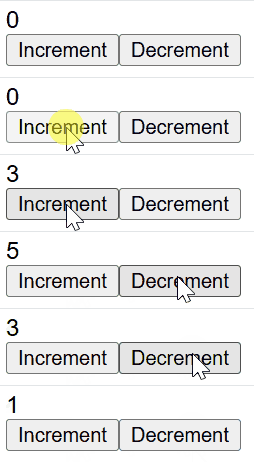
In this example
- The useState hook initializes a state variable counter with a value of 0. The setCounter function is used to update this state.
- When the Increment button is clicked, setCounter(counter + 1) increases the counter value by 1.
- When the Decrement button is clicked, setCounter(counter - 1) decreases the counter value by 1.
- The current value of counter is displayed inside a and updates automatically when the state changes.
- Two buttons trigger handleClick1 and handleClick2 using onClick, allowing users to increase or decrease the counter.
13. Why use a callback function in state updates?
English Answer (Optimized): State updates in React are asynchronous and may be batched. If you update state based on the previous value (e.g.,
setCount(count + 1)), it might use a stale value from a previous render. Using a callback (setCount(prev => prev + 1)) ensures you are always working with the latest state, preventing race conditions and bugs.中文翻译: React 的状态更新是异步的,并且可能会进行批处理。如果你基于旧值更新状态(如
setCount(count + 1)),它可能会使用旧渲染周期中的过时值。 使用回调函数(如setCount(prev => prev + 1))能确保你始终在最新的状态基础上进行操作,从而防止竞态条件和 Bug。14. What is React-Material UI?
不需要管。
15. What is flux architecture in redux?
过时了。
16. Explain the useMemo hook in react?
The useMemo is a hook used in the functional component of react that returns a memoized value. In Computer Science, memoization is a concept used in general when we don’t need to recompute the function with a given argument for the next time as it returns the cached result. A memoized function remembers the results of output for a given set of inputs.
17. Does React useState Hook update immediately?
React do not update immediately, although it seems immediate at first glance. React keep track of the states by queuing them in the order they are called. React queue all the changes to be made and update once the component Re-render which is not immediate. This is how React knows which value corresponds to which state. It goes as per the queue every time the component tries to re-render.
18. When to use useCallback, useMemo and useEffect ?
- useEffect is a function that can be used as an alternative to lifecycle methods such as componentDidMount, componenetWillUnmount, and componentDidUpdate in functional components
- useCallback can be used when we want to prevent unnecessary renders from the chld components. It helps to resolve side effects
- useMemo is used when we want to re-render based on cache values as makes the application faster
中文翻译:
useEffect:用于处理副作用(获取数据、手动操作 DOM、订阅)。在渲染之后执行。useMemo:缓存计算后的值。用于昂贵的计算,避免每次渲染时都重复计算。useCallback:缓存函数实例。当向经过memo优化的子组件传递函数时使用,以防止子组件不必要的重渲染。 注:useState的更新不是立即生效的;它会触发一次重渲染,新值在下一次渲染中才可用。
19. Explain the types of router in React?
There are three types of routers in React:
- Memory Router: The memory router keeps the URL changes in memory not in the user browsers.
- Browser Router: It uses HTML5 history API (i.e. pushState, replaceState, and popState API) to keep your UI in sync with the URL
- Hash Router: Hash router uses client-side hash routing. It uses the hash portion of the URL (i.e. window.location.hash) to keep your UI in sync with the URL.
20. What is StrictMode in React?
The React StrictMode can be viewed as a helper component that allows developers to code efficiently and brings to their attention any suspicious code which might have been accidentally added to the application. The StrictMode can be applied to any section of the application, not necessarily to the entire application.
xxxxxxxxxx111import React from "react";2import ReactDOM from "react-dom/client";3import App from "./App";45const root = ReactDOM.createRoot(document.getElementById("root"));67root.render(8<React.StrictMode>9<App />10</React.StrictMode>11);21. What is Conditional Rendering in React?
Conditional rendering in React means dynamically displaying components or elements based on a condition. Instead of rendering everything at once, React decides what to render based on the current state, props, or logic. We can use conditional rendering when:
- We have to Show/hide UI elements based on user authentication.
- Display different layouts based on user roles.
- Render UI dynamically based on API responses.
- Show loading spinners while fetching data.
22. What is React Router?
已经有答案了。
23. What is the difference between the React Hooks and Classes?
已经有答案了。
24. How Data is passed between the React Components?
In React, data is passed between components using props. The way data flows between components depends on whether they are parent-child, sibling components, or if you're using state management techniques like context or Redux.
25. What is Lazy Loading in React?
English Answer: Lazy Loading is a performance optimization technique that loads components only when they are needed. In React, this is achieved using
React.lazy()and<Suspense>. It helps reduce the initial bundle size, leading to faster initial page loads.中文翻译: 懒加载 (Lazy Loading) 是一种性能优化技术,仅在需要时才加载组件。在 React 中,通过
React.lazy()和<Suspense>来实现。它有助于减少初始包体积,从而加快页面的首次加载速度。26. Explain Redux and its components.
Redux is a state management library that helps manage the application state globally. React-Redux is used to connect Redux state to React components. There are the three main components of the redux:
- store: It holds the application state
- actions: It describe what to do
- reducers: It define how the state changes in response to actions
27. How React Routing is different from Conventional Routing?
React Routing is used in Single Page Applications (SPAs), while conventional routing typically applies to multi-page applications. Here’s how they differ:
Features React Routing Conventional Routing Page Loading No full page reload; components are dynamically rendered. Entire page reload happens with every navigation. SEO Considerations React Router needs additional configurations (like SSR or dynamic rendering) to optimize SEO. SEO is typically easier to manage since pages are fully rendered by the server. Navigation Navigation is handled by JavaScript on the client-side, often using Link and NavLink components. Navigation is handled by the server through HTML anchor tags (). Technology Managed via React Router; uses client-side routing. Managed by server-side routing (e.g., Express, PHP). URL Structure URLs can have dynamic parameters handled by React Router (e.g., /product/:id). URLs are typically static and are managed by the server. English Answer: The main difference lies in how the browser handles transitions:
- Conventional Routing: Every time the URL changes, the browser sends a request to the server and reloads the entire HTML page.
- React Routing (SPA): It uses the HTML5 History API to update the URL without refreshing the page. Only the specific components that need to change are re-rendered, providing a faster, app-like experience.
中文翻译: 主要区别在于浏览器如何处理页面切换:
- 传统路由:每当 URL 改变,浏览器都会向服务器发送请求并重新加载整个 HTML 页面。
- React 路由 (SPA):它使用 HTML5 History API 来更新 URL 而无需刷新页面。只有需要变化的特定组件会被重新渲染,从而提供更快速、更像原生应用的体验。
28. How to avoid binding in ReactJS?(已过时,不用看)
29: What are props in React?
In React, props (short for "properties") are a way of passing data from a parent component to a child component. Props are read-only and are used to customize or control the behavior of a component. They help make components reusable and dynamic by allowing different data to be passed into them.
30. What is the use of CSS modules in React?
CSS Modules help you keep your styles specific to each React component, so they don't affect other components. In simple terms, it lets you write CSS for one component without worrying about messing up the styles of other parts of your app. This is especially useful when your app grows larger and has many components, making it easier to manage styles without conflicts.